<?xml version="1.0" encoding="UTF-8"?><feed
	xmlns="http://www.w3.org/2005/Atom"
	xmlns:thr="http://purl.org/syndication/thread/1.0"
	xml:lang="zh-TW"
	>
	<title type="text">隨心所欲</title>
	<subtitle type="text">iOS Developer 的隨筆記錄</subtitle>

	<updated>2026-03-08T09:39:52Z</updated>

	<link rel="alternate" type="text/html" href="https://doeverythingiwant.com" />
	<id>https://doeverythingiwant.com/feed/atom/</id>
	<link rel="self" type="application/atom+xml" href="https://doeverythingiwant.com/feed/atom/" />

	<generator uri="https://wordpress.org/" version="6.9.4">WordPress</generator>
<icon>https://doeverythingiwant.com/wp-content/uploads/2025/08/cropped-0802.png</icon>
	<entry>
		<author>
			<name>艾普利</name>
							<uri>https://doeverythingiwant.com</uri>
						</author>

		<title type="html"><![CDATA[[AI] Xcode 26 與 AI]]></title>
		<link rel="alternate" type="text/html" href="https://doeverythingiwant.com/ai-xcode-26-and-ai/" />

		<id>https://doeverythingiwant.com/?p=2512</id>
		<updated>2026-03-08T09:39:52Z</updated>
		<published>2026-03-08T09:39:49Z</published>
		<category scheme="https://doeverythingiwant.com" term="寫程式" /><category scheme="https://doeverythingiwant.com" term="AI" /><category scheme="https://doeverythingiwant.com" term="Apple intelligence" /><category scheme="https://doeverythingiwant.com" term="iOS" /><category scheme="https://doeverythingiwant.com" term="Xcode" />
		<summary type="html"><![CDATA[Photo by Immo Wegmann on Unspl&#8230;]]></summary>

					<content type="html" xml:base="https://doeverythingiwant.com/ai-xcode-26-and-ai/"><![CDATA[
<p class="has-text-align-center">Photo by <a href="https://unsplash.com/@tinkerman?utm_source=unsplash&amp;utm_medium=referral&amp;utm_content=creditCopyText" target="_blank" rel="noopener">Immo Wegmann</a> on <a href="https://unsplash.com/photos/a-piece-of-cardboard-with-a-keyboard-appearing-through-it-vi1HXPw6hyw?utm_source=unsplash&amp;utm_medium=referral&amp;utm_content=creditCopyText" target="_blank" rel="noopener">Unsplash</a></p>


<p>Xcode 26 終於可以使用 AI 啦~~雖然去年的發表了，我因為公司在趕專案累到爆，回家就不想開電腦，前一陣子才開始使用，覺得很好玩(?)</p>


<p>不過，相信很多人應該都有用 Claude code 這位神奇的夥伴，和在 Xcode 裡直接使用體驗不太一樣。 </p>


<p>這篇簡單寫一下要怎麼使用，最後加上我個人的小心得</p>


<span id="more-2512"></span>


<h2 class="wp-block-heading">前置作業</h2>


<ul class="wp-block-list">
<li>需要有 Xcode 26</li>


<li>macOS 需要升到Tahoe</li>


<li>ChatGPT 帳號或 Claude 的付費帳號<br></li>
</ul>


<hr class="wp-block-separator has-alpha-channel-opacity"/>


<h2 class="wp-block-heading">Xcode 26</h2>


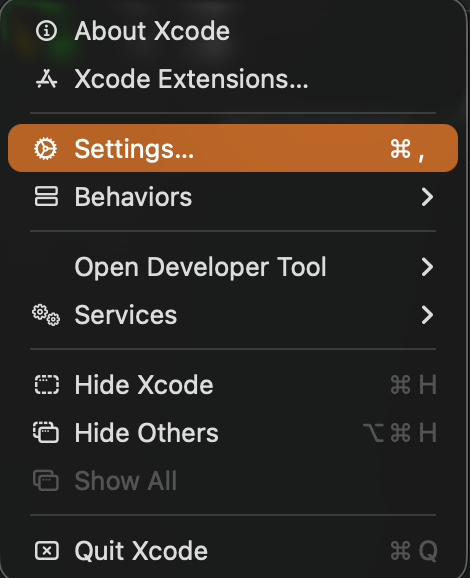
<p>設定 AI Tool 的方式，先點開 Xcode 的 Setting </p>


<div class="wp-block-image">
<figure class="aligncenter size-large is-resized"><img fetchpriority="high" decoding="async" width="470" height="578" src="https://doeverythingiwant.com/wp-content/uploads/2026/03/AI01.png" alt="" class="wp-image-2514" style="width:446px;height:auto" srcset="https://doeverythingiwant.com/wp-content/uploads/2026/03/AI01.png 470w, https://doeverythingiwant.com/wp-content/uploads/2026/03/AI01-244x300.png 244w" sizes="(max-width: 470px) 100vw, 470px" /></figure>
</div>


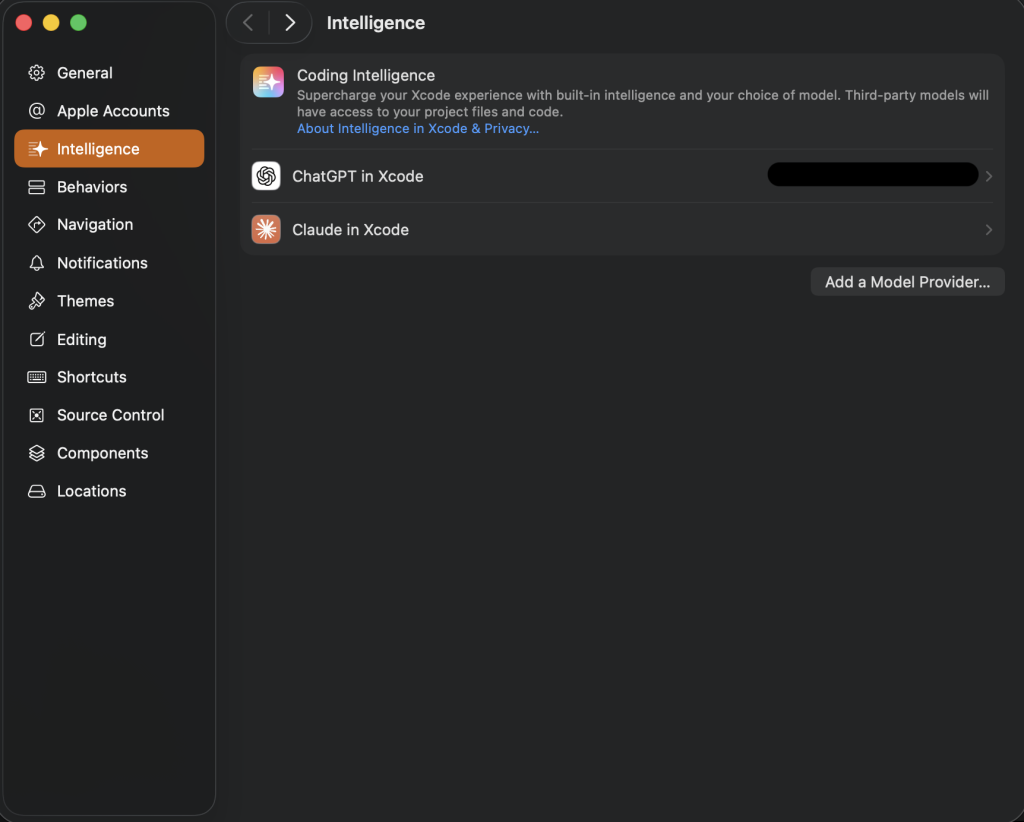
<p>在左側選單上可以看到 Intelligence 的選項，Xcode 內建 ChatGPT 與 Claude ，只要點下去登入就可以了，ChatGPT 免費帳號就可以使用，但 Claude 必須要是付費帳號才可以使用 。</p>


<div class="wp-block-image">
<figure class="aligncenter size-large is-resized"><img decoding="async" width="1024" height="822" src="https://doeverythingiwant.com/wp-content/uploads/2026/03/AI02-1024x822.png" alt="" class="wp-image-2515" style="aspect-ratio:1.2457363416976752;width:730px;height:auto" srcset="https://doeverythingiwant.com/wp-content/uploads/2026/03/AI02-1024x822.png 1024w, https://doeverythingiwant.com/wp-content/uploads/2026/03/AI02-300x241.png 300w, https://doeverythingiwant.com/wp-content/uploads/2026/03/AI02-768x617.png 768w, https://doeverythingiwant.com/wp-content/uploads/2026/03/AI02-1536x1233.png 1536w, https://doeverythingiwant.com/wp-content/uploads/2026/03/AI02-1170x939.png 1170w, https://doeverythingiwant.com/wp-content/uploads/2026/03/AI02-585x470.png 585w, https://doeverythingiwant.com/wp-content/uploads/2026/03/AI02.png 1724w" sizes="(max-width: 1024px) 100vw, 1024px" /></figure>
</div>


<hr class="wp-block-separator has-alpha-channel-opacity"/>


<h2 class="wp-block-heading">使用方式</h2>


<div class="wp-block-image is-style-default">
<figure class="alignleft size-full is-resized"><img decoding="async" width="784" height="2140" src="https://doeverythingiwant.com/wp-content/uploads/2026/03/AI03.png" alt="" class="wp-image-2518" style="aspect-ratio:0.3663558394999438;width:240px;height:auto" srcset="https://doeverythingiwant.com/wp-content/uploads/2026/03/AI03.png 784w, https://doeverythingiwant.com/wp-content/uploads/2026/03/AI03-110x300.png 110w, https://doeverythingiwant.com/wp-content/uploads/2026/03/AI03-375x1024.png 375w, https://doeverythingiwant.com/wp-content/uploads/2026/03/AI03-768x2096.png 768w, https://doeverythingiwant.com/wp-content/uploads/2026/03/AI03-563x1536.png 563w, https://doeverythingiwant.com/wp-content/uploads/2026/03/AI03-750x2048.png 750w, https://doeverythingiwant.com/wp-content/uploads/2026/03/AI03-585x1597.png 585w" sizes="(max-width: 784px) 100vw, 784px" /></figure>
</div>


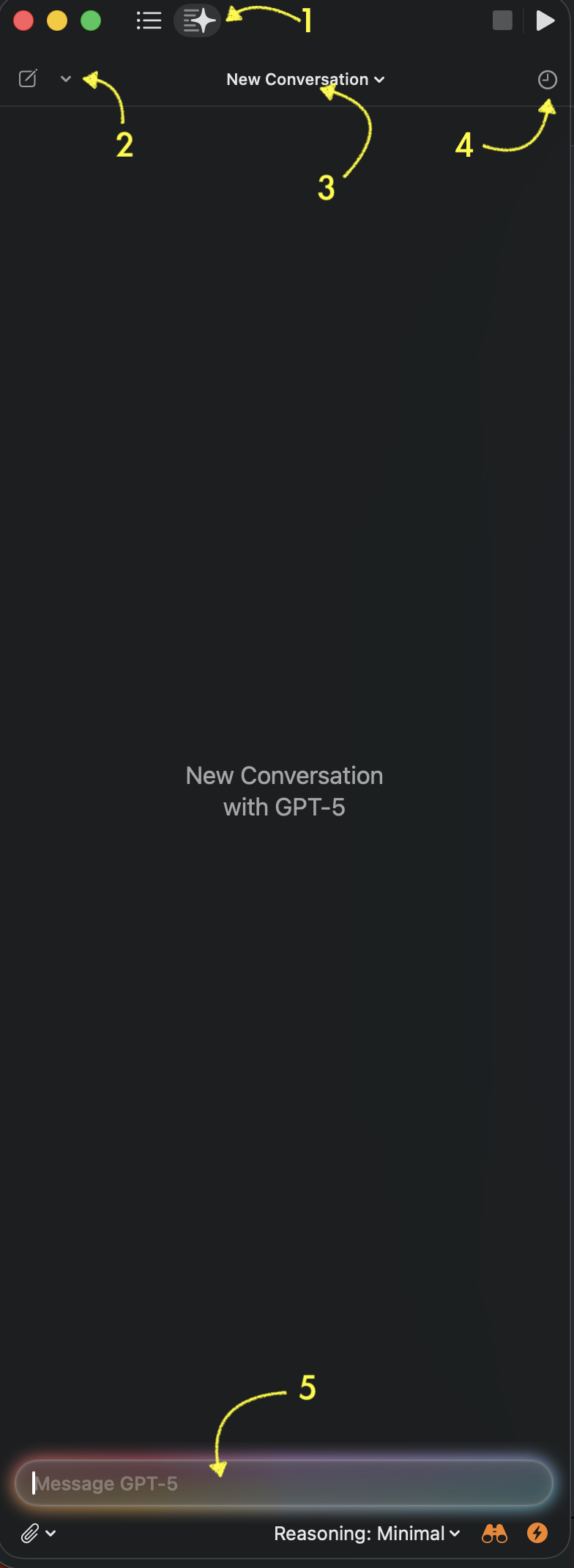
<p>首先，要切到 AI 功能，可以由圖示中的 (1) 的按鈕作切換</p>


<p>(2) 的按鈕可以選擇想要使用的AI 模型是哪一種</p>


<p>(3) 可以選擇對話串</p>


<p>(4) 是歷史記錄，不過，不知道是不是因為我使用的是免費帳號，只要重開Xcode 後，歷史記錄就會消失了</p>


<p>(5) 就是下Prompt 的地方</p>


<p></p>


<p></p>


<p></p>


<p></p>


<p></p>


<p></p>


<p></p>


<hr class="wp-block-separator has-alpha-channel-opacity"/>


<h2 class="wp-block-heading">Coding</h2>


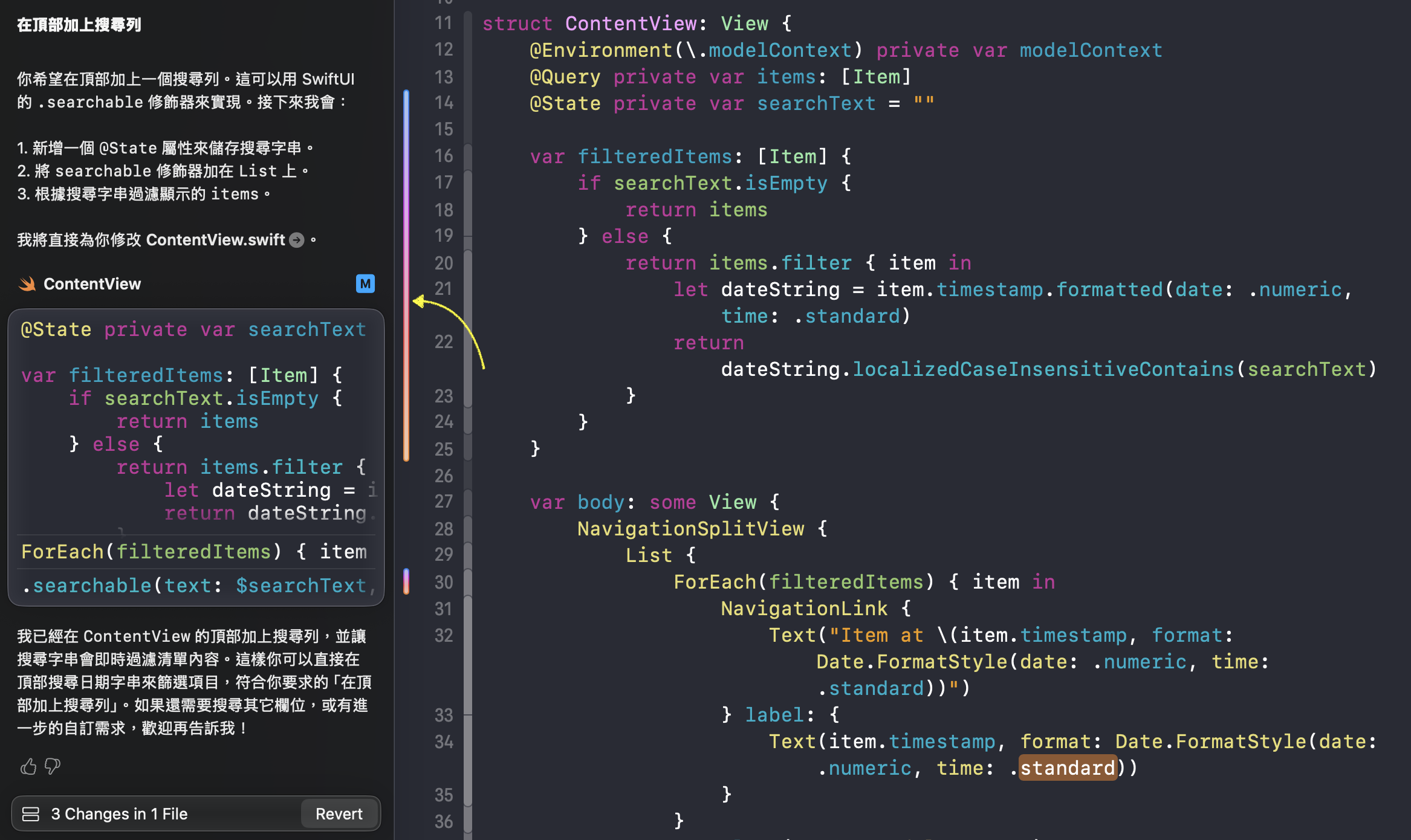
<p>在範例圖中，我下了「在頂部加上搜尋列」，它就會自動幫我修改程式，會先告訴你會怎麼調整，然後就會直接調整了。</p>


<p>AI 調整的部分會用彩色Highlight 標示，一般有使用 Git 的話，也會用單一顏色來表示調整過的地方，說不定Apple 就是為了特別區別自己調整的與 AI 調整的才用彩色Highlight。</p>


<p>手機使用 AI 的時候也會有彩色Highlight出現，Apple 就是這一點我覺得做得很不錯，統一提示，只要在Apple 的產品看到彩色Highlight就會知道是AI 的東西</p>


<div class="wp-block-image">
<figure class="aligncenter size-full"><img loading="lazy" decoding="async" width="2334" height="1390" src="https://doeverythingiwant.com/wp-content/uploads/2026/03/AI04.png" alt="" class="wp-image-2519" srcset="https://doeverythingiwant.com/wp-content/uploads/2026/03/AI04.png 2334w, https://doeverythingiwant.com/wp-content/uploads/2026/03/AI04-300x179.png 300w, https://doeverythingiwant.com/wp-content/uploads/2026/03/AI04-1024x610.png 1024w, https://doeverythingiwant.com/wp-content/uploads/2026/03/AI04-768x457.png 768w, https://doeverythingiwant.com/wp-content/uploads/2026/03/AI04-1536x915.png 1536w, https://doeverythingiwant.com/wp-content/uploads/2026/03/AI04-2048x1220.png 2048w, https://doeverythingiwant.com/wp-content/uploads/2026/03/AI04-1920x1143.png 1920w, https://doeverythingiwant.com/wp-content/uploads/2026/03/AI04-1170x697.png 1170w, https://doeverythingiwant.com/wp-content/uploads/2026/03/AI04-585x348.png 585w" sizes="(max-width: 2334px) 100vw, 2334px" /></figure>
</div>


<hr class="wp-block-separator has-alpha-channel-opacity"/>


<h2 class="wp-block-heading">心得</h2>


<p>在 Xcode 使用 AI 就是這麼簡單，我個人覺得比 Claude code 的入門簡單一點，不過，Claude code 能做的事情很多，多學一點完全沒有問題。</p>


<p>在上面的範例中，下完指令之後它就會自動修改程式，實際上，若使用在即有專案它遇到問題的時候也是會先詢問，例如「這會影響到某個檔案是否需要一起調整」、「這需要看某個檔案是否可以檢視它」之類的。</p>


<p>若是請它調整即有的程式，我會先要求提出調整計畫，確認它會修改什麼、怎麼修改，才讓它執行，不會一下子就讓它調整。</p>


<p>當把AI 做為小幫手的時候，比較需要學習的是Prompt 要怎麼下，它寫出來的東西也要Review 。 我個人這陣子的使用心得是覺得很有趣，當然也會有覺得害怕的部分，但有趣佔大多數，它會寫出一些我從來沒有想過的方式，也可以學習，就是和過去一樣「把好的東西學起來」。</p>


<p>最後祝大家 Coding 愉快</p>


<p></p>
]]></content>
		
					<link rel="replies" type="text/html" href="https://doeverythingiwant.com/ai-xcode-26-and-ai/#comments" thr:count="0" />
			<link rel="replies" type="application/atom+xml" href="https://doeverythingiwant.com/ai-xcode-26-and-ai/feed/atom/" thr:count="0" />
			<thr:total>0</thr:total>
			</entry>
		<entry>
		<author>
			<name>艾普利</name>
							<uri>https://doeverythingiwant.com</uri>
						</author>

		<title type="html"><![CDATA[[SwiftUI] AttributedString and Hyperlink]]></title>
		<link rel="alternate" type="text/html" href="https://doeverythingiwant.com/swiftui-attributedstring-and-hyperlink/" />

		<id>https://doeverythingiwant.com/?p=2466</id>
		<updated>2025-05-18T09:33:19Z</updated>
		<published>2025-05-18T09:33:16Z</published>
		<category scheme="https://doeverythingiwant.com" term="寫程式" /><category scheme="https://doeverythingiwant.com" term="AttributedString" /><category scheme="https://doeverythingiwant.com" term="Hyperlink" /><category scheme="https://doeverythingiwant.com" term="iOS" />
		<summary type="html"><![CDATA[Photo by Vladislav Klapin on U&#8230;]]></summary>

					<content type="html" xml:base="https://doeverythingiwant.com/swiftui-attributedstring-and-hyperlink/"><![CDATA[
<p class="has-text-align-center">Photo by <a href="https://unsplash.com/@lemonvlad?utm_content=creditCopyText&amp;utm_medium=referral&amp;utm_source=unsplash" target="_blank" rel="noopener">Vladislav Klapin</a> on <a href="https://unsplash.com/photos/a-person-holding-up-a-sign-that-says-hello-PVr9Gsj93Pc?utm_content=creditCopyText&amp;utm_medium=referral&amp;utm_source=unsplash" target="_blank" rel="noopener">Unsplash</a></p>


<p>記得還在寫 UIKit 的時候，其實很不喜歡寫 <code>AttributedString</code> 就覺得很麻煩，因為通常會有這樣的需求都是因為想要做超連結(Hyperlink)，記得那時候要做到這樣是很麻煩的，除了要使用 <code>AttributedString</code>外，還要做點擊開網頁…通常&#8230;&#8230;都會想盡辨法打消設計師們的念頭。</p>


<span id="more-2466"></span>


<p>最近因為工作上的需要，所以就來去找找SwiftUI 要怎麼做超連結(Hyperlink)的方式，發現比起過去簡單很多，無論是在設定URL 或是 Handle Action 都很簡單，好用很多。</p>


<h2 class="wp-block-heading">Text</h2>


<p>若是想要在一串文字中間加上不同的字體或顏色，最常想到的就是 <a href="https://developer.apple.com/documentation/foundation/attributedstring" target="_blank" rel="noopener">AttributedString</a> ，不過，若不是想要做超連結的話，SwiftUI 的 <code>Text</code> 就可以做到了，像這樣:</p>


<div class="hcb_wrap"><pre class="prism line-numbers lang-swift" data-lang="Swift"><code> Text(&quot;Hello, world! &quot;)
 +
 Text(&quot;Go google &quot;)
   .foregroundColor(.orange)
 +
 Text(&quot;website&quot;)</code></pre></div>


<p>印出來的結果會是這樣。</p>


<figure class="wp-block-image size-full"><img loading="lazy" decoding="async" width="548" height="86" src="https://doeverythingiwant.com/wp-content/uploads/2025/05/截圖-2025-05-04-下午4.35.17.png" alt="" class="wp-image-2467" srcset="https://doeverythingiwant.com/wp-content/uploads/2025/05/截圖-2025-05-04-下午4.35.17.png 548w, https://doeverythingiwant.com/wp-content/uploads/2025/05/截圖-2025-05-04-下午4.35.17-300x47.png 300w" sizes="(max-width: 548px) 100vw, 548px" /></figure>


<p>不過，如果想要加上 <code>.onTapGesture</code> 的話就沒有辨法了，用 <code>+</code> 串連的<code>Text</code>已經不是單純的 <code>Text</code> ，無法使用<code>.onTapGesture</code> 所以，想要做超連結的話，還是用<code>AttributedString</code>比較好。</p>


<h2 class="wp-block-heading"><code>AttributedString</code></h2>


<p><a href="https://developer.apple.com/documentation/foundation/attributedstring" target="_blank" rel="noopener">AttributedString</a> 是可以讓一串文字裡加入不同樣式的一種方式，這次特別寫出超連結的做法，它的做法是計算出特定字串的 Range ，再依據這個 Range 中的字是需要什麼樣式和顏色，只要能讓它知道需要不一樣的字是什麼，基本上就沒什麼問題。</p>


<p><code>AttributedString</code>中的 <code>AttributeScopes.FoundationAttributes</code> 裡有提供 <code>Link</code> 參數，就是用來做為超連結使用的。</p>


<p>以下是實作方式</p>


<div class="hcb_wrap"><pre class="prism line-numbers lang-swift" data-lang="Swift"><code>private func getLinkText(_ text: String, linkText: String, linkURL: String) -&gt; AttributedString {
    var attributedString = AttributedString(text)
    attributedString.font = .systemFont(ofSize: 14, weight: .regular)
    attributedString.foregroundColor = Color.gray
        
    if let range = attributedString.range(of: linkText) {
        attributedString[range].font = .systemFont(ofSize: 14, weight: .medium)
        attributedString[range].foregroundColor = Color.orange
        attributedString[range].link = URL(string: linkURL)
    }
        
    return attributedString
}</code></pre></div>


<p>解析一下程式碼</p>


<ul class="wp-block-list">
<li><code>var attributedString = AttributedString(text)</code> ，這裡的 <code>text</code> 需要是全部的句子</li>


<li><code>attributedString.range(of: linkText)</code>，<code>linkText</code> 就是想要做成超連結的文字段</li>


<li><code>attributedString[range].link</code>，這裡寫入想要開啟的網站</li>
</ul>


<p><code>font</code> 與 <code>foregroundColor</code> 可以自行設定，應該有人有發現，像 <code>View</code> 的 <code>foregroundColor</code> 已經<mark style="background-color:rgba(0, 0, 0, 0)" class="has-inline-color has-vivid-red-color">Deprecated</mark> 了，現在都使用 <code>foregroundStyle</code> ，但這裡的 <code>foregroundColor</code> 是 <code>AttributeScopes</code>裡的，不是 <code>View</code> 的喔。</p>


<h2 class="wp-block-heading">Handle link</h2>


<p>已經組好有中間有超連結的字串了，再來就直接用 <code>Text</code> 就可以了，最後的範例是要怎麼Handle link 行為</p>


<div class="hcb_wrap"><pre class="prism line-numbers lang-swift" data-lang="Swift"><code>Text(getLinkText(&quot;Hello, world! Go google&quot;, linkText: &quot;google&quot;, linkURL: &quot;https://www.google.com.tw&quot;))
                .environment(\.openURL, OpenURLAction { _ in
                    return .systemAction
                })</code></pre></div>


<p>重要的就是使用 <a href="https://developer.apple.com/documentation/swiftui/openurlaction" target="_blank" rel="noreferrer noopener">OpenURLAction</a> ，與 <code>environment(\.openURL)</code> 一起使用，就可以Handle Link Text 點擊的行為，範例上寫的 <code>.systemAction</code> 的行為，就是指外開至Safari ，以下簡單說明 <code>OpenURLAction</code> 的回傳值。</p>


<ul class="wp-block-list">
<li><a href="https://developer.apple.com/documentation/swiftui/openurlaction/result/handled" target="_blank" rel="noreferrer noopener">handled</a> : 就是自行處理，例如，想要直接用 <code>.sheet</code> 開啟網頁，這時候就需要 <code>return handled。</code></li>


<li><a href="https://developer.apple.com/documentation/swiftui/openurlaction/result/discarded" target="_blank" rel="noopener">discarded</a> : 就是不做任何處理。</li>


<li><a href="https://developer.apple.com/documentation/swiftui/openurlaction/result/systemaction" target="_blank" rel="noopener">systemAction</a> : 就是直接外開至Safari ，由Safari 幫你開網頁</li>


<li><a href="https://developer.apple.com/documentation/swiftui/openurlaction/result/systemaction(_:)" target="_blank" rel="noopener">systemAction(_:)</a> : 是用 Safari 開，但是還可以帶別的 URL 或是需要加工URL (這個URL 是指Swift 裡的 <a href="https://developer.apple.com/documentation/Foundation/URL" target="_blank" rel="noopener">URL</a> 物件喔)</li>
</ul>


<h2 class="wp-block-heading">最後</h2>


<p>只要記得上述這些東西，就可以比較簡單地寫出超連結的文字了，畢竟是手機，建議二組超連結的文字不要太近，不然很容易會點錯喔…</p>


<p>最後，祝大家 Coding 愉快!!</p>


<p></p>
]]></content>
		
					<link rel="replies" type="text/html" href="https://doeverythingiwant.com/swiftui-attributedstring-and-hyperlink/#comments" thr:count="0" />
			<link rel="replies" type="application/atom+xml" href="https://doeverythingiwant.com/swiftui-attributedstring-and-hyperlink/feed/atom/" thr:count="0" />
			<thr:total>0</thr:total>
			</entry>
		<entry>
		<author>
			<name>艾普利</name>
							<uri>https://doeverythingiwant.com</uri>
						</author>

		<title type="html"><![CDATA[[玩遊戲] 真．三國無雙 起源]]></title>
		<link rel="alternate" type="text/html" href="https://doeverythingiwant.com/dynasty-warriors-origin/" />

		<id>https://doeverythingiwant.com/?p=2400</id>
		<updated>2025-03-23T11:32:35Z</updated>
		<published>2025-03-23T11:32:33Z</published>
		<category scheme="https://doeverythingiwant.com" term="放輕鬆" /><category scheme="https://doeverythingiwant.com" term="Dynasty Warriors Origin" /><category scheme="https://doeverythingiwant.com" term="三國無雙" /><category scheme="https://doeverythingiwant.com" term="起源" />
		<summary type="html"><![CDATA[我並不是無雙系列的粉絲，無雙系列也只玩過幾款，在起源之前應該&#8230;]]></summary>

					<content type="html" xml:base="https://doeverythingiwant.com/dynasty-warriors-origin/"><![CDATA[
<p>我並不是無雙系列的粉絲，無雙系列也只玩過幾款，在起源之前應該是玩戰國無雙5，一次掃蕩大量敵人的感覺真的很舒壓啊，也可以多少了解一點歷史，雖然遊戲可能會因需要調整故事內容，但大致上來說還算是依照歷史在跑。</p>


<p>去年第一次知道真．三國無雙要出正統續作，看完介紹之後第一時間就去預購，只是沒買到特典版本讓我很後悔…</p>


<p>以下會有一點劇透(?)喔…</p>


<span id="more-2400"></span>


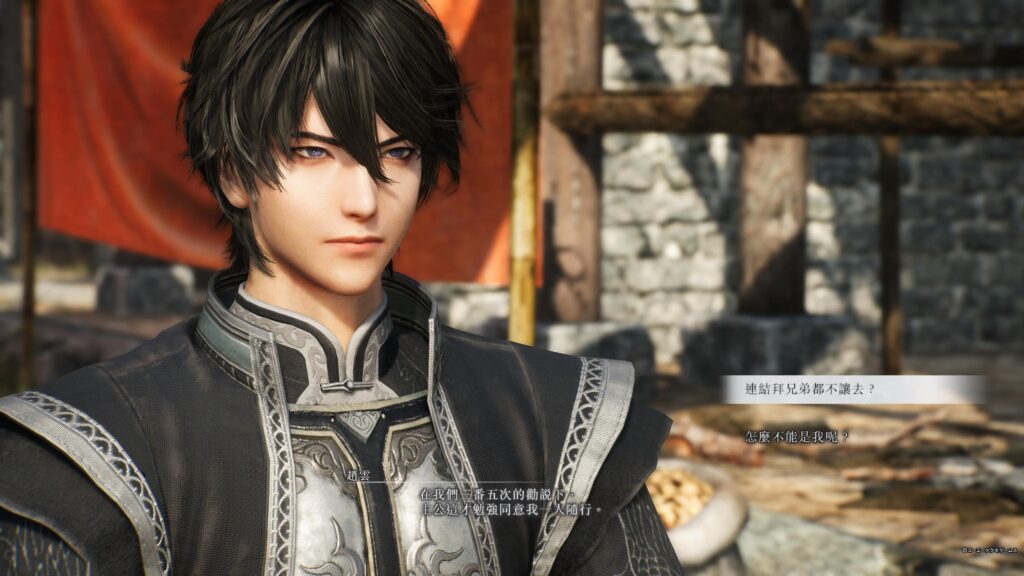
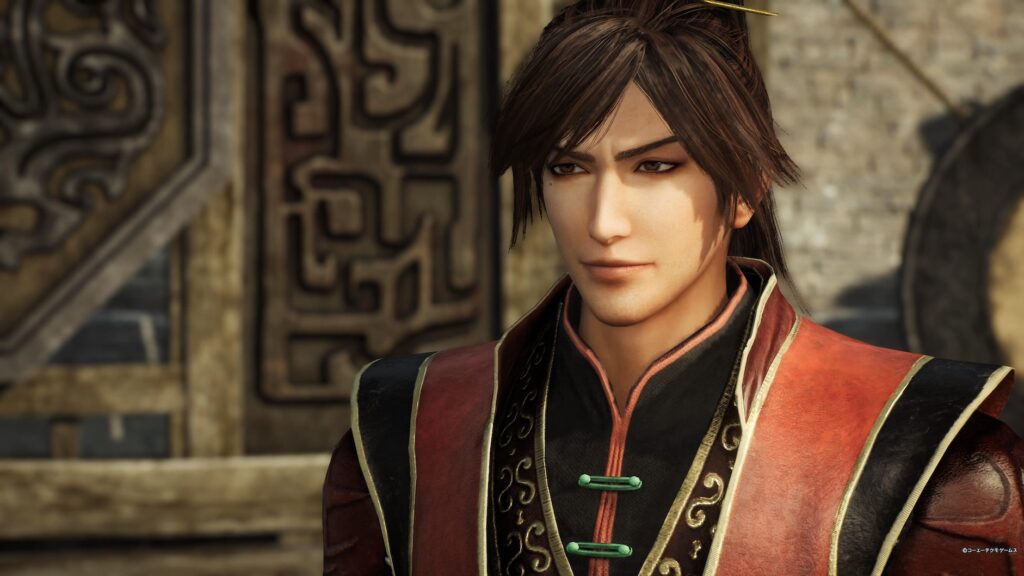
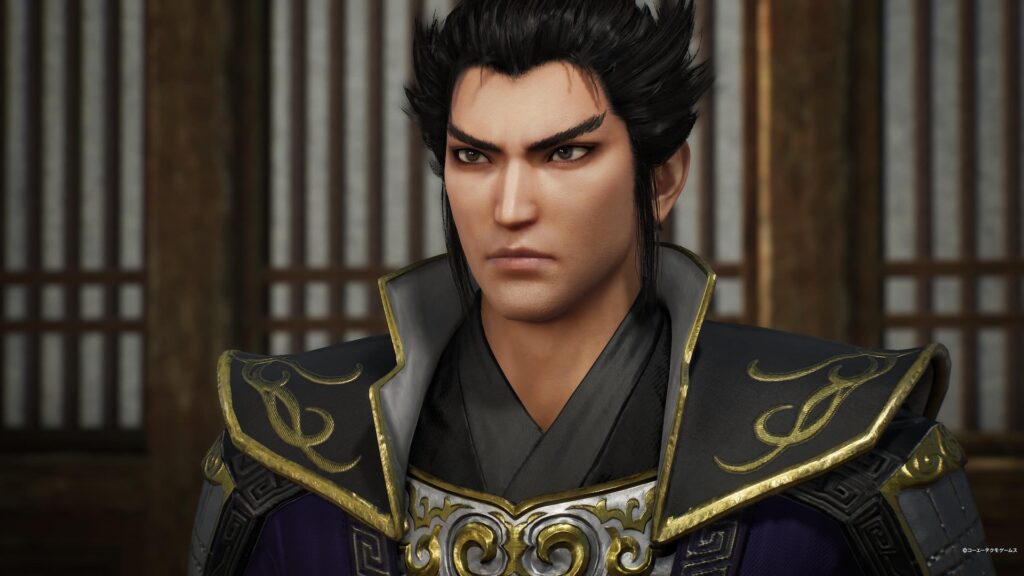
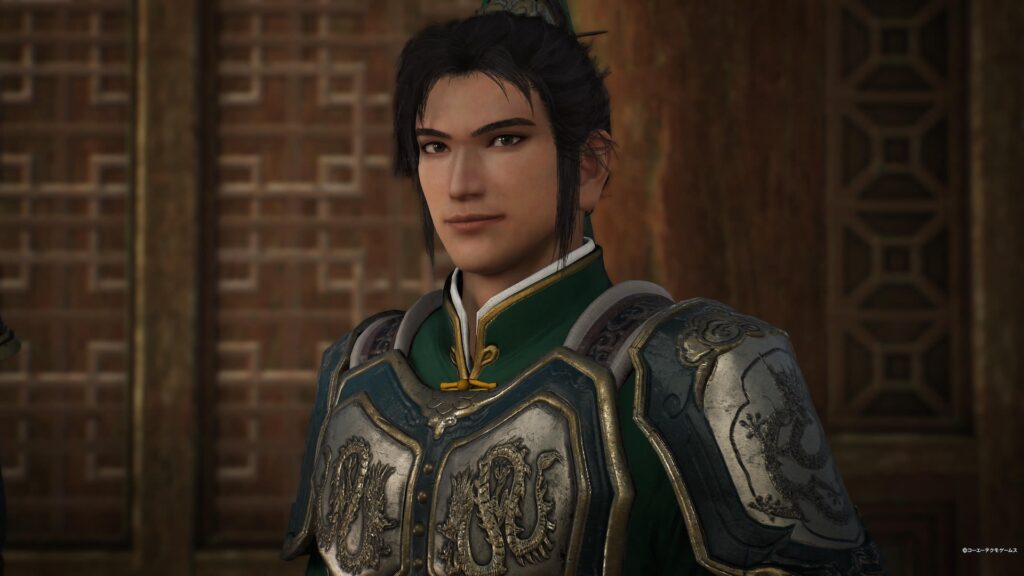
<p>真．三國無雙，劇情就是圍繞在魏蜀吳三國的故事，藍本應該是小說三國演義吧，其實故事劇情沒什麼好說的(?)，起源的故事線是從黃巾之亂到赤壁，連三國鼎立都還沒有的時間線，且多了一位主角，以往系列主要是以武將們的視角來發展故事，這次丟進一位第三者，由第三者的角度來看三國故事的發展，光是這一點就足以引起我的興趣，再加上男主角造型我非常喜歡，就直接去下單了。</p>


<figure class="wp-block-embed is-type-video is-provider-youtube wp-block-embed-youtube wp-embed-aspect-16-9 wp-has-aspect-ratio"><div class="wp-block-embed__wrapper">
<iframe title="『真・三國無双 ORIGINS』1stトレーラー" width="1170" height="658" src="https://www.youtube.com/embed/Ni4oFVC5sV8?feature=oembed" frameborder="0" allow="accelerometer; autoplay; clipboard-write; encrypted-media; gyroscope; picture-in-picture; web-share" referrerpolicy="strict-origin-when-cross-origin" allowfullscreen></iframe>
</div></figure>


<h2 class="wp-block-heading">無名主角</h2>


<p>來聊聊擁有偉大的臉(?) 的主角吧，設定是一位失去記憶的角色，一開始出場就很帥氣，戲裡戲外都很容易吸引人們目光的角色(像我)，雖然有預設名，不過可以改名字的(想名字一直是很困難的事情啊…)，不過我一直覺得這種可以自己取名字的主角，會讓人更有代入感。</p>


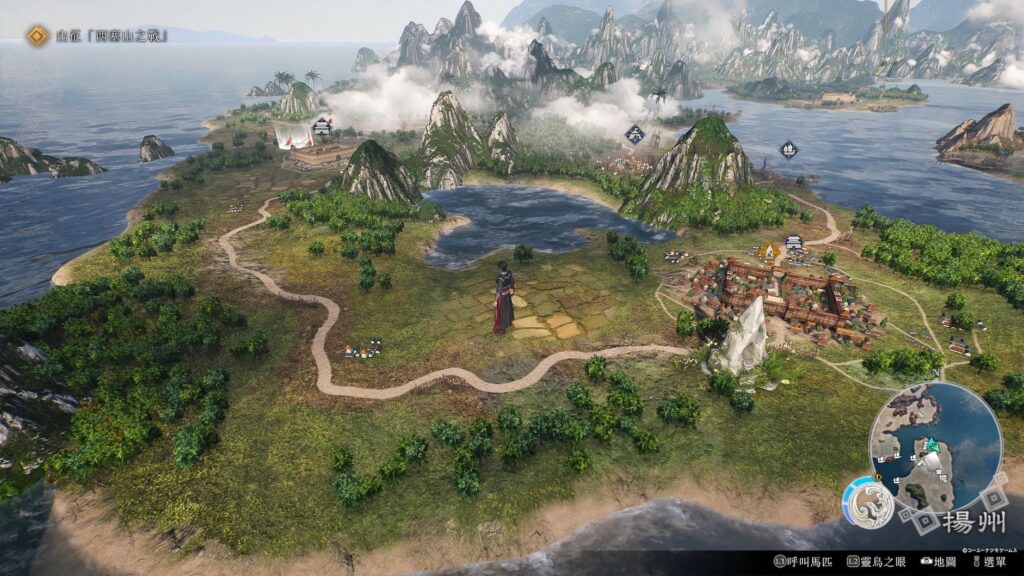
<p>主角有個暱稱是紫鸞，有雙很特別也很漂亮的眼睛，當然不只是漂亮而已，還有專屬技能「靈鳥之眼」，在遊戲裡有很多地方都會用到它，讓紫鸞在某些戰役變成關鍵性角色，也讓武將們合理留意到這位武藝高強又特別的人。</p>


<p>紫鸞自己本身也有故事線，在參與各種戰役之餘，還要尋找自身的記憶，前期就會遇到醫生小伙伴，他會和主角一起出現在休息的畫面裡，說真的，二周目為了某位情誼線從前面開始玩，沒看到醫生小伙伴在旁邊總有些不習慣，紫鸞的故事線其實也很不錯，並不算是很驚艷的故事，算是很合理的故事，未來如果有要延續這個設定的話，也是蠻好的。</p>


<p>玩家主要能操作的就是這位紫鸞，屬於無口系角色，日語聲優是福山潤喔~但多數是在戰場上才聽得到他的聲音，所以紫鸞基本上是不開口說話的，除了對話選項 XD (但選了也不會有聲音)。</p>


<div class="wp-block-image">
<figure class="aligncenter size-large"><img loading="lazy" decoding="async" width="1024" height="576" src="https://doeverythingiwant.com/wp-content/uploads/2025/03/真・三國無雙-起源_20250214215235-1024x576.jpg" alt="" class="wp-image-2423" srcset="https://doeverythingiwant.com/wp-content/uploads/2025/03/真・三國無雙-起源_20250214215235-1024x576.jpg 1024w, https://doeverythingiwant.com/wp-content/uploads/2025/03/真・三國無雙-起源_20250214215235-300x169.jpg 300w, https://doeverythingiwant.com/wp-content/uploads/2025/03/真・三國無雙-起源_20250214215235-768x432.jpg 768w, https://doeverythingiwant.com/wp-content/uploads/2025/03/真・三國無雙-起源_20250214215235-1536x864.jpg 1536w, https://doeverythingiwant.com/wp-content/uploads/2025/03/真・三國無雙-起源_20250214215235-2048x1152.jpg 2048w, https://doeverythingiwant.com/wp-content/uploads/2025/03/真・三國無雙-起源_20250214215235-1920x1080.jpg 1920w, https://doeverythingiwant.com/wp-content/uploads/2025/03/真・三國無雙-起源_20250214215235-1170x658.jpg 1170w, https://doeverythingiwant.com/wp-content/uploads/2025/03/真・三國無雙-起源_20250214215235-585x329.jpg 585w" sizes="(max-width: 1024px) 100vw, 1024px" /></figure>
</div>


<h2 class="wp-block-heading">故事線</h2>


<p>紫鸞一開始的立場是不屬於任何一個陣營，因此和任何陣營的武將都可以坐下來好好聊天，藉此認識更多武將，了解他們在這戰亂的時代裡有什麼樣的想法，雖然文本看來都很有一回事(笑)，也許有些人會覺得不是很好，我自己是覺得很有趣，紫鸞本身的選項也有很多欠楱的台詞，讓人很想選，然後就會收到對方更欠楱或是吐糟的回應。</p>


<p>中期需要選擇魏、蜀、吳其中一個陣營加入，之後就會專心以這陣營的故事線為主，畢竟一周目的體驗比較好，若有偏好的陣營，建議一周目就選擇加入喜歡的陣營，不需要太擔心打不過，遊戲可以調整難度。</p>


<p>魏、蜀、吳三條故事線，基本就要跑三周目，再加上魏、蜀、吳 IF 線，想要看完全部分的故事至少要跑到四周目，一周目我是玩一般難度大概40~50小時，可能是我卡在呂布身上太久(笑)，不過打贏呂布就是開心，且贏呂布才可以展開他的情誼線。(因為要引吸到他的注意啊)</p>


<p>魏、蜀、吳在這段時間各有特色，曹操在這時期就已經很清楚知道自己要什麼，然後就去做。</p>


<p>劉備是雖然知道自己想做什麼，但卻很迷惘，還找不到正確的路。</p>


<p>孫家就是看孫權弟弟的成長，原本走在父親與哥哥後面，突然就必須站在眾人面前成為君主，為了成為大家認可的君主而不斷努力。</p>


<h2 class="wp-block-heading">武器</h2>


<p>武器一共9+1種，一周目只會有9種武器，劍、槍、手甲、飛圈、朴刀、棍、雙戟、矛、偃月刀，再加上要到二周目才會開放，呂布所使用的方天戟。</p>


<p>我很喜歡飛圈，飛圈是可以丟出去應該可以算是短中距型的武器，是個剛開始比較難掌握，需要練習一下的武器，習慣之後就會覺得飛圈很好玩。</p>


<p>紫鸞升級的方式是需要熟練各種武器，每種武器都各有特色，操作方式也都不一樣，有主打蓄力攻擊或連續攻擊的，按法上也不相同，紫鸞的動作也會不一樣，這就很好玩了，當然一定會有一、二種(或更多)武器是不習慣使用的，為了升級還是要去玩一玩。</p>


<figure class="wp-block-image size-large"><img loading="lazy" decoding="async" width="1024" height="576" src="https://doeverythingiwant.com/wp-content/uploads/2025/03/真・三國無雙-起源_20250322120521-1024x576.jpg" alt="" class="wp-image-2438" srcset="https://doeverythingiwant.com/wp-content/uploads/2025/03/真・三國無雙-起源_20250322120521-1024x576.jpg 1024w, https://doeverythingiwant.com/wp-content/uploads/2025/03/真・三國無雙-起源_20250322120521-300x169.jpg 300w, https://doeverythingiwant.com/wp-content/uploads/2025/03/真・三國無雙-起源_20250322120521-768x432.jpg 768w, https://doeverythingiwant.com/wp-content/uploads/2025/03/真・三國無雙-起源_20250322120521-1536x863.jpg 1536w, https://doeverythingiwant.com/wp-content/uploads/2025/03/真・三國無雙-起源_20250322120521-1170x658.jpg 1170w, https://doeverythingiwant.com/wp-content/uploads/2025/03/真・三國無雙-起源_20250322120521-585x329.jpg 585w, https://doeverythingiwant.com/wp-content/uploads/2025/03/真・三國無雙-起源_20250322120521.jpg 1882w" sizes="(max-width: 1024px) 100vw, 1024px" /></figure>


<h2 class="wp-block-heading">戰役</h2>


<p>無雙遊戲最重要的就是各種戰役，不得不說，起源的各種大大小小的戰役都很好玩，首先，小兵不再是只會呆呆站在那裡給你打，一周目還不是很強的時候，常常會被小兵給群毆，頭上有名稱的路人武將也不是隨隨便便就可以打贏的。</p>


<p>武將都會有稱為「外功」的防禦盾，打破外功才能讓武將受到比較高的傷害，更別說中後期有一些必須打破外功才能贏的武將，在與武將對峙的時候要怎麼樣用最快的方式打破外功就是一大重點，只不過身旁的敵對小兵也不會乖乖地在旁邊看，時不時就會攻擊你，真的很煩 XD</p>


<p>在攻擊有名字的武將時，還有機會進入單挑模式，大家會清出場地並圍成一圈，若正好有我方友軍在的話，他們也會加入到觀眾群裡，雖然你多數時間是沒空看觀眾，在突然看到友軍(他會特別明顯)出現在觀眾群就覺得特別有趣。</p>


<p>此時畫面會變得像格鬥遊戲一樣，雙方血條會出現在上方，只能用武藝不能用無雙技，這完全是考驗技術的時間，把對方血條打爆就贏了，只要有分出勝負，無論輸贏都會有特別收尾演出。單挑有分計時與無計時類型，計時型比較有緊張感，且通常對方的戰意都很高不是很好打，贏了會大增士氣，輸了有可能會直接敗北，很刺激。</p>


<p>說到士氣，這真的很重要，士氣高的時候，友軍真的很強，可以完全不用理他們，他們就可以一個又一個擊倒對方武將與佔領據點，相對的如果士氣低的時候，連小兵都可以輕鬆打倒友軍武將，不過呢…大多數的戰役一開場士氣都很低，主角常常需要到處救援，主角只要跑到友軍武將旁邊他們就會回血，一周目的時候真的常常到處跑來跑去，畢竟友軍武將陣亡有時候就很難獲勝，只好當救援隊了(笑)。</p>


<p>說到戰役中最喜歡的部分就是大軍團，敵方有大軍團，我方為了進軍大軍團也會集結再一起衝進去，這真的很熱血，真的不得不讚賞OMEGA FORCE的技術，畫面上少說五、六百人(聽說最多可以到千人)，完全沒有卡頓感，紫鸞常常會埋沒在人群裡完全找不到他，如果獨自衝進大軍團很高機率會被群毆，敵方會使出大戰術(我方也會)，需要依條件解決，常常需要在一團混亂中找到目標物(人)，就算看到了，也要想辨法在一團混亂中前進過去，真的就是一團混亂，然後就會聽到武將在求救，還要在一團混亂中去救援，超級忙的。</p>


<figure class="wp-block-image size-large"><img loading="lazy" decoding="async" width="1024" height="576" src="https://doeverythingiwant.com/wp-content/uploads/2025/03/真・三國無雙-起源_20250130220519_1-1024x576.jpg" alt="" class="wp-image-2422" srcset="https://doeverythingiwant.com/wp-content/uploads/2025/03/真・三國無雙-起源_20250130220519_1-1024x576.jpg 1024w, https://doeverythingiwant.com/wp-content/uploads/2025/03/真・三國無雙-起源_20250130220519_1-300x169.jpg 300w, https://doeverythingiwant.com/wp-content/uploads/2025/03/真・三國無雙-起源_20250130220519_1-768x432.jpg 768w, https://doeverythingiwant.com/wp-content/uploads/2025/03/真・三國無雙-起源_20250130220519_1-1536x864.jpg 1536w, https://doeverythingiwant.com/wp-content/uploads/2025/03/真・三國無雙-起源_20250130220519_1-2048x1152.jpg 2048w, https://doeverythingiwant.com/wp-content/uploads/2025/03/真・三國無雙-起源_20250130220519_1-1920x1080.jpg 1920w, https://doeverythingiwant.com/wp-content/uploads/2025/03/真・三國無雙-起源_20250130220519_1-1170x658.jpg 1170w, https://doeverythingiwant.com/wp-content/uploads/2025/03/真・三國無雙-起源_20250130220519_1-585x329.jpg 585w" sizes="(max-width: 1024px) 100vw, 1024px" /></figure>


<h2 class="wp-block-heading">情誼線</h2>


<p>來聊聊讓男玩家覺得快被掰彎，讓女玩家開心不已(?)還直接推廣此作品的情誼線劇情。起源在無雙系列中劇情算是很多的，主線劇情也佔了有1/3的時間，我很喜歡主線劇情，詳細地說故事，讓人覺得不太像在玩無雙。</p>


<p>各武將們的情誼線更是讓武將們有表現自我個性的一面，只是各陣營老闆們的情誼線都和主線綁在一起，沒有特別為他們做特殊故事，讓我覺得有點可惜，不過孫家是只有一半綁主線，畢竟他們換老闆的速度快嘛~</p>


<p>武將們的好感度上升時，就可以觸發情誼故事，而好感度上升的方式，主要是接武將們給的課題，有訓練的也有委託任務的，只要完成好感度就可以上升，有些武將需要達到特定條件才會出現，例如霸總呂布，呂布的情誼線可說是本作經典啊，不看可惜。</p>


<p>不得不說，許多武將老是沒事就往紫鸞的房間跑，還都是晚上跑來，然後都想要和紫鸞徹夜長談，明明前面在說些很正常的話，後面就要加一句「想把一片心留在你這」、「明明有機會離開我身邊…」、「你了解我的…」、「為什麼你總是能讓我感覺開心」，不然就是霸總發言，「想要把你佔為己有」、「強行據為己有…」什麼的，這真的不能怪玩家們會想歪啊，還是這其實是製作組故意的!? (讚賞)，瞬間就變成在玩戀與三國了!?</p>


<p>當然還是有女性角色的且說話也是各種撩，可說比男性還要大膽，基本上是直球對決了。</p>


<p>(月英姐姐!!什麼時候要量產等身人偶啊!!我想預購!!)。</p>


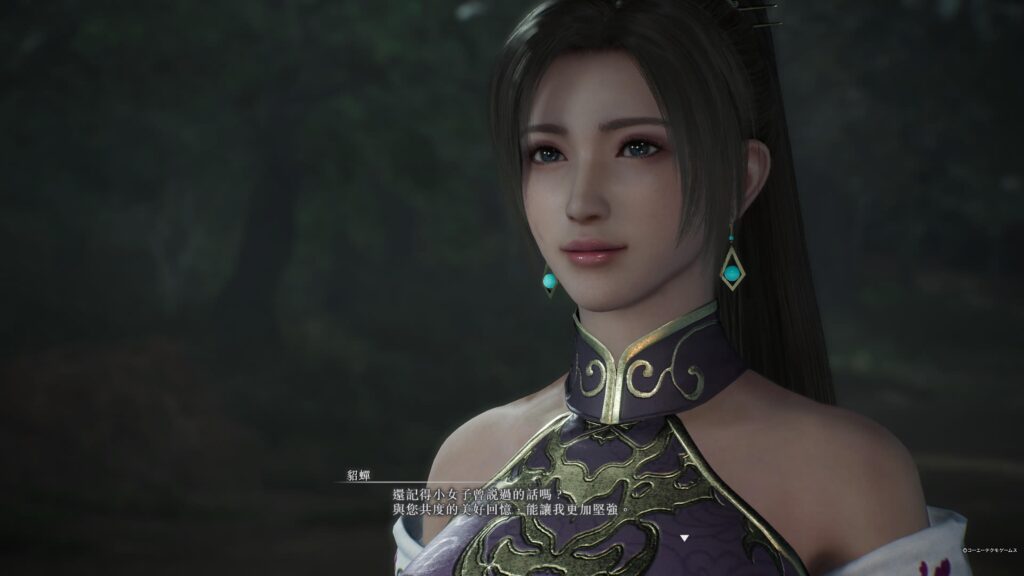
<p>本作貂蟬真的很漂亮，看了會很喜歡，和紫鸞也有很好的互動，明明感覺製作組就是想要把他們放一起，但最後又…耶，不是，不要這樣啊，看了讓人很心急耶，可惡。</p>


<p>情誼故事真的很有趣，感覺看到了角色們的另一面，會很想把所有角色的情誼故事都開出來，每當一場戰役結束就會想看看有沒有人站在大地圖上。</p>


<p>魏國美男(?)團在某章節的時候會快站滿整個區域，看到真的會笑出來，每個人都想要找紫鸞聊天。</p>


<p>(曹老闆：他是我的靈鳥!)。</p>


<p>蜀國人數相對少了點，但有很多可愛的伙伴，像張飛、趙雲、周倉啦，沒想到張飛是個傲嬌個性。</p>


<p>(張飛：我才不是!)</p>


<p>色氣滿點的沒想到是孔明，那個扣子!!! 快把你的扣子給我扣好!!! (孔明: (笑))</p>


<p>吳國就是很多和善(?)的長輩們，還有可愛的弟弟、妹妹與小雛鳥(無誤)，凌統很可愛!!但後來得知凌統的聲優過世了，以後就聽不到這位聲優配的凌統了(´;ω;`)。</p>


<figure class="wp-block-image size-large"><img loading="lazy" decoding="async" width="1024" height="576" src="https://doeverythingiwant.com/wp-content/uploads/2025/03/真・三國無雙-起源_20250322212614-1024x576.jpg" alt="" class="wp-image-2439" srcset="https://doeverythingiwant.com/wp-content/uploads/2025/03/真・三國無雙-起源_20250322212614-1024x576.jpg 1024w, https://doeverythingiwant.com/wp-content/uploads/2025/03/真・三國無雙-起源_20250322212614-300x169.jpg 300w, https://doeverythingiwant.com/wp-content/uploads/2025/03/真・三國無雙-起源_20250322212614-768x432.jpg 768w, https://doeverythingiwant.com/wp-content/uploads/2025/03/真・三國無雙-起源_20250322212614-1536x863.jpg 1536w, https://doeverythingiwant.com/wp-content/uploads/2025/03/真・三國無雙-起源_20250322212614-1170x658.jpg 1170w, https://doeverythingiwant.com/wp-content/uploads/2025/03/真・三國無雙-起源_20250322212614-585x329.jpg 585w, https://doeverythingiwant.com/wp-content/uploads/2025/03/真・三國無雙-起源_20250322212614.jpg 1882w" sizes="(max-width: 1024px) 100vw, 1024px" /></figure>


<h2 class="wp-block-heading">閒聊</h2>


<p>來聊聊老闆們(?)。這次老闆們感覺年輕很多啊~</p>


<h4 class="wp-block-heading">曹老闆</h4>


<p>先從曹老闆開始吧，氣勢凌人啊，曹老闆因為早早就知道自己要走的路是霸．道，以理為信念，為了達到目標不論多冷血也會去做，舉手投足都是充滿了氣．勢!! </p>


<p>曹老闆&#8230;總是很嚴肅，我好像沒有看到他笑過，稱讚人的時候好像也沒有笑，但是! 被這樣的人稱讚的時候真的會特別開心。嗯…曹老闆好像沒有放鬆下來的時刻，聽惇哥他很喜歡做詩，很可惜不能看到他放鬆做詩的情誼故事。對了，曹老闆聽說很愛幫人取綽號，紫鸞也是曹老闆取的，只是…這本來就是他的代稱，曹老闆正好想到一樣的 XD (曹老闆：&#8230;&#8230;)</p>


<p>聽說曹老闆很小隻，去查了一下，發現曹老闆應該是162cm左右，老實說以男性的身高來說確實是不高，不過惇哥大概是188cm ，紫鸞感覺也有超過170cm，嗯…真的有點小隻，難怪每次在大軍團裡都很難找到曹老闆，都要用靈鳥之眼掃一下才知道曹老闆在哪裡。在大地圖上，曹老闆看起來特別可愛。</p>


<p>(曹老闆：尊重!)</p>


<figure class="wp-block-image size-large"><img loading="lazy" decoding="async" width="1024" height="576" src="https://doeverythingiwant.com/wp-content/uploads/2025/03/真・三國無雙-起源_20250322230025-1024x576.jpg" alt="" class="wp-image-2441" srcset="https://doeverythingiwant.com/wp-content/uploads/2025/03/真・三國無雙-起源_20250322230025-1024x576.jpg 1024w, https://doeverythingiwant.com/wp-content/uploads/2025/03/真・三國無雙-起源_20250322230025-300x169.jpg 300w, https://doeverythingiwant.com/wp-content/uploads/2025/03/真・三國無雙-起源_20250322230025-768x432.jpg 768w, https://doeverythingiwant.com/wp-content/uploads/2025/03/真・三國無雙-起源_20250322230025-1536x864.jpg 1536w, https://doeverythingiwant.com/wp-content/uploads/2025/03/真・三國無雙-起源_20250322230025-1170x658.jpg 1170w, https://doeverythingiwant.com/wp-content/uploads/2025/03/真・三國無雙-起源_20250322230025-585x329.jpg 585w, https://doeverythingiwant.com/wp-content/uploads/2025/03/真・三國無雙-起源_20250322230025.jpg 1920w" sizes="(max-width: 1024px) 100vw, 1024px" /></figure>


<h3 class="wp-block-heading">劉老闆</h3>


<p>劉老闆就是人很好的混混頭子 (劉老闆：尊重!) ，真的年輕很多耶…(曹老闆：……)他和曹老闆正好相反，是以仁義為信念，這時期的劉老闆幾乎都在別人的底下做事情，只要有人求助於他，就一定會去幫對方，就算對方是個討厭的人也會去，這方面根本就是爛好人嘛。</p>


<p>劉老闆確實如張飛所說，一些肉麻的話可以很順就說出口，加上會跟隨他的人都對他死心踏地，非常會收買人心。在遊戲裡的某一戰，軍議的時候，劉老闆說「我認為重要的不是城池，而是我身邊的你們。」</p>


<p>哇~~~~~~~我當下真的有一點被感動到，但是下一秒我就收回我的感動，因為我看到此戰役的敗北條件是「任一友軍敗北」(靠!…北邊走…)</p>


<p>(劉老闆：(ゝ∀･))</p>


<figure class="wp-block-image size-large"><img loading="lazy" decoding="async" width="1024" height="576" src="https://doeverythingiwant.com/wp-content/uploads/2025/03/真・三國無雙-起源_20250322230126-1024x576.jpg" alt="" class="wp-image-2442" srcset="https://doeverythingiwant.com/wp-content/uploads/2025/03/真・三國無雙-起源_20250322230126-1024x576.jpg 1024w, https://doeverythingiwant.com/wp-content/uploads/2025/03/真・三國無雙-起源_20250322230126-300x169.jpg 300w, https://doeverythingiwant.com/wp-content/uploads/2025/03/真・三國無雙-起源_20250322230126-768x432.jpg 768w, https://doeverythingiwant.com/wp-content/uploads/2025/03/真・三國無雙-起源_20250322230126-1536x864.jpg 1536w, https://doeverythingiwant.com/wp-content/uploads/2025/03/真・三國無雙-起源_20250322230126-1170x658.jpg 1170w, https://doeverythingiwant.com/wp-content/uploads/2025/03/真・三國無雙-起源_20250322230126-585x329.jpg 585w, https://doeverythingiwant.com/wp-content/uploads/2025/03/真・三國無雙-起源_20250322230126.jpg 1920w" sizes="(max-width: 1024px) 100vw, 1024px" /></figure>


<h3 class="wp-block-heading">孫老闆們</h3>


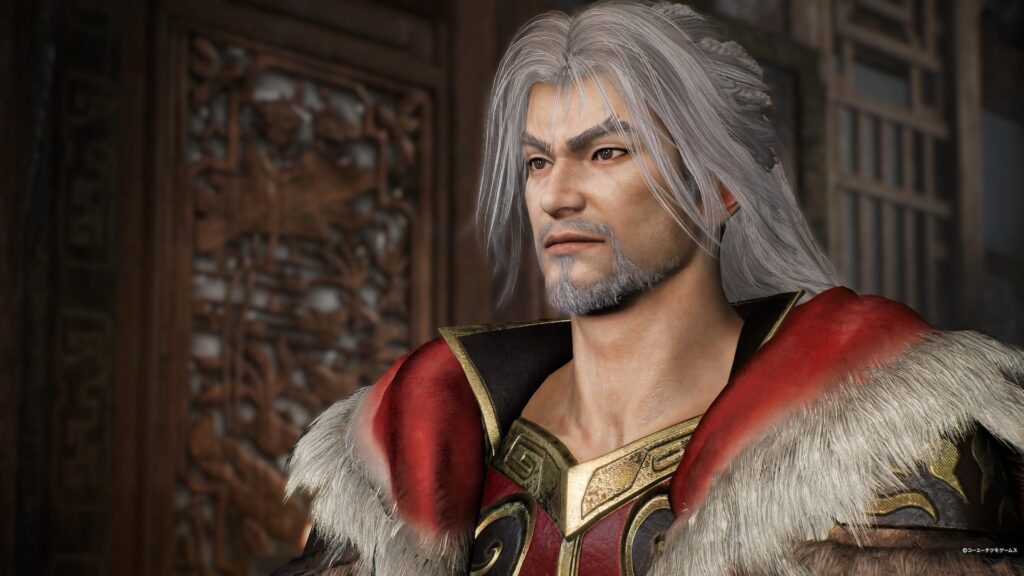
<p>孫氏家族企業的三位老闆各有特色</p>


<h4 class="wp-block-heading">孫堅爸爸</h4>


<p>帥爆!!</p>


<p>出場就不斷散發成熟男人的帥氣，穩重感十足，完全和前面二位小毛頭老闆們完全不一樣。</p>


<p>(曹老闆&amp;劉老闆：尊重!) </p>


<p>孫堅爸爸是第一位直接表明想要把紫鸞拐走，被劉老闆發現還表示可惜，我真的差點就想要和孫堅爸爸走了(冷靜)，主線故事出場時間不算多，但我們還有情誼線!!! </p>


<p>結論：孫堅爸爸真的很想拐走紫鸞</p>


<figure class="wp-block-image size-large"><img loading="lazy" decoding="async" width="1024" height="576" src="https://doeverythingiwant.com/wp-content/uploads/2025/03/真・三國無雙-起源_20250322225753-1024x576.jpg" alt="" class="wp-image-2440" srcset="https://doeverythingiwant.com/wp-content/uploads/2025/03/真・三國無雙-起源_20250322225753-1024x576.jpg 1024w, https://doeverythingiwant.com/wp-content/uploads/2025/03/真・三國無雙-起源_20250322225753-300x169.jpg 300w, https://doeverythingiwant.com/wp-content/uploads/2025/03/真・三國無雙-起源_20250322225753-768x432.jpg 768w, https://doeverythingiwant.com/wp-content/uploads/2025/03/真・三國無雙-起源_20250322225753-1536x864.jpg 1536w, https://doeverythingiwant.com/wp-content/uploads/2025/03/真・三國無雙-起源_20250322225753-1170x658.jpg 1170w, https://doeverythingiwant.com/wp-content/uploads/2025/03/真・三國無雙-起源_20250322225753-585x329.jpg 585w, https://doeverythingiwant.com/wp-content/uploads/2025/03/真・三國無雙-起源_20250322225753.jpg 1920w" sizes="(max-width: 1024px) 100vw, 1024px" /></figure>


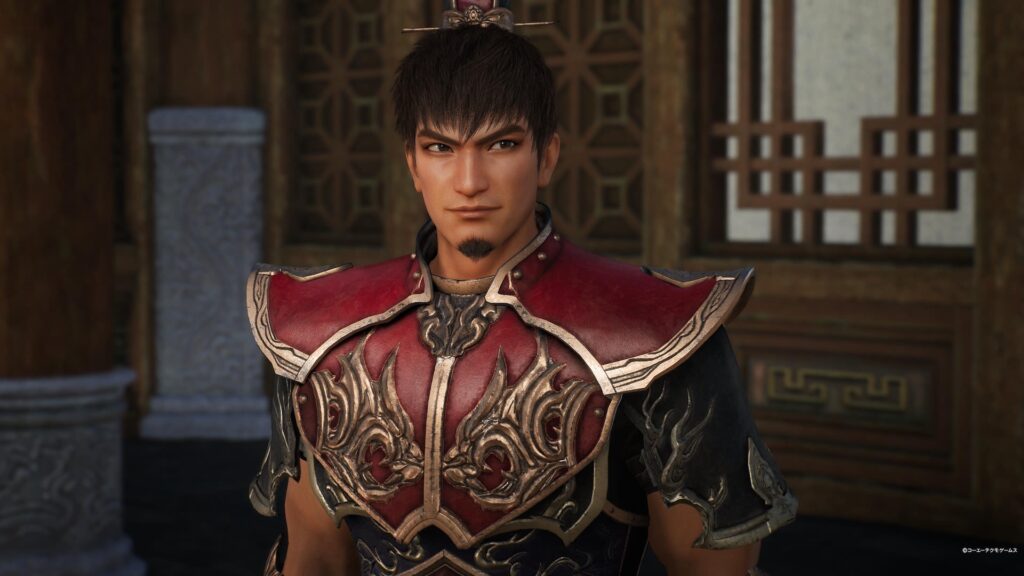
<h4 class="wp-block-heading">孫策哥哥</h4>


<p>出場就是大場面!!</p>


<p>不管什麼時候都會爆衝的個性很帥!! (周瑜：………) ，雖然他的壓力海山大，為了大家真的很努力。</p>


<p>孫策哥哥退場的那場戰役，只是一個沒注意孫策哥哥就不見了，雖然知道會退場，但突然消失讓人太驚恐了(燃起了想跑救哥哥的 IF 線了)。</p>


<figure class="wp-block-image size-large"><img loading="lazy" decoding="async" width="1024" height="576" src="https://doeverythingiwant.com/wp-content/uploads/2025/03/真・三國無雙-起源_20250323093944-1024x576.jpg" alt="" class="wp-image-2443" srcset="https://doeverythingiwant.com/wp-content/uploads/2025/03/真・三國無雙-起源_20250323093944-1024x576.jpg 1024w, https://doeverythingiwant.com/wp-content/uploads/2025/03/真・三國無雙-起源_20250323093944-300x169.jpg 300w, https://doeverythingiwant.com/wp-content/uploads/2025/03/真・三國無雙-起源_20250323093944-768x432.jpg 768w, https://doeverythingiwant.com/wp-content/uploads/2025/03/真・三國無雙-起源_20250323093944-1536x864.jpg 1536w, https://doeverythingiwant.com/wp-content/uploads/2025/03/真・三國無雙-起源_20250323093944-1170x658.jpg 1170w, https://doeverythingiwant.com/wp-content/uploads/2025/03/真・三國無雙-起源_20250323093944-585x329.jpg 585w, https://doeverythingiwant.com/wp-content/uploads/2025/03/真・三國無雙-起源_20250323093944.jpg 1920w" sizes="(max-width: 1024px) 100vw, 1024px" /></figure>


<h4 class="wp-block-heading">孫權弟弟</h4>


<p>形象和我過去認知的差太多了(稱讚)，弟弟感很重啊!!! (孫權：我本來就是弟弟…)，真的超想摸摸他的頭。</p>


<p>(孫策：我懂我懂。)</p>


<p>(尚香：……)</p>


<p>一直站在他前面的人們很突然地都消失了，完全感受得到他突然接手家族事業(?)那種不安感，還好有其他人支持他，看著他成長真的很感動啊…</p>


<p>(孫權：聽說有 IF 線，那我可以退位嗎?)</p>


<p>(尚香：聽說有 IF 線…………(拿出飛圈))</p>


<p>(周瑜：聽說有 IF 線……………(拿出棍))</p>


<figure class="wp-block-image size-large"><img loading="lazy" decoding="async" width="1024" height="576" src="https://doeverythingiwant.com/wp-content/uploads/2025/03/真・三國無雙-起源_20250323094112-1024x576.jpg" alt="" class="wp-image-2444" srcset="https://doeverythingiwant.com/wp-content/uploads/2025/03/真・三國無雙-起源_20250323094112-1024x576.jpg 1024w, https://doeverythingiwant.com/wp-content/uploads/2025/03/真・三國無雙-起源_20250323094112-300x169.jpg 300w, https://doeverythingiwant.com/wp-content/uploads/2025/03/真・三國無雙-起源_20250323094112-768x432.jpg 768w, https://doeverythingiwant.com/wp-content/uploads/2025/03/真・三國無雙-起源_20250323094112-1536x864.jpg 1536w, https://doeverythingiwant.com/wp-content/uploads/2025/03/真・三國無雙-起源_20250323094112-1170x658.jpg 1170w, https://doeverythingiwant.com/wp-content/uploads/2025/03/真・三國無雙-起源_20250323094112-585x329.jpg 585w, https://doeverythingiwant.com/wp-content/uploads/2025/03/真・三國無雙-起源_20250323094112.jpg 1920w" sizes="(max-width: 1024px) 100vw, 1024px" /></figure>


<h2 class="wp-block-heading">最後</h2>


<p>已經很久沒有想努力把白金拿到手，二周目之後開放的各種新要素，讓人會一直想玩下去，勇戰無雙之人的各種挑戰也是非常刺激。正常情況下玩，雖然友軍很廢，但可以拉士氣來讓友軍變強一點，但打挑戰的時候，常常沒時間去提升士氣，只能硬闖敵營直接打倒目標，此時的友軍真心廢爆，我軍老闆們很容易敗走，但又沒空去救老闆們，根本就是要和時間賽跑，然後再內心希望老闆們撐久一點…</p>


<p>這遊戲真的讓人忍不住想要說很多很多，很有趣也很好玩，與過去的無雙系列都不同，無論是新手老手都可以很享受的遊戲。</p>


<p>是一款玩下去會讓人心情舒爽且還可以保養眼睛的遊戲!!</p>


<figure class="wp-block-image size-large"><img loading="lazy" decoding="async" width="1024" height="576" src="https://doeverythingiwant.com/wp-content/uploads/2025/03/真・三國無雙-起源_20250213214916-1024x576.jpg" alt="" class="wp-image-2424" srcset="https://doeverythingiwant.com/wp-content/uploads/2025/03/真・三國無雙-起源_20250213214916-1024x576.jpg 1024w, https://doeverythingiwant.com/wp-content/uploads/2025/03/真・三國無雙-起源_20250213214916-300x169.jpg 300w, https://doeverythingiwant.com/wp-content/uploads/2025/03/真・三國無雙-起源_20250213214916-768x432.jpg 768w, https://doeverythingiwant.com/wp-content/uploads/2025/03/真・三國無雙-起源_20250213214916-1536x864.jpg 1536w, https://doeverythingiwant.com/wp-content/uploads/2025/03/真・三國無雙-起源_20250213214916-2048x1152.jpg 2048w, https://doeverythingiwant.com/wp-content/uploads/2025/03/真・三國無雙-起源_20250213214916-1920x1080.jpg 1920w, https://doeverythingiwant.com/wp-content/uploads/2025/03/真・三國無雙-起源_20250213214916-1170x658.jpg 1170w, https://doeverythingiwant.com/wp-content/uploads/2025/03/真・三國無雙-起源_20250213214916-585x329.jpg 585w" sizes="(max-width: 1024px) 100vw, 1024px" /></figure>
]]></content>
		
					<link rel="replies" type="text/html" href="https://doeverythingiwant.com/dynasty-warriors-origin/#comments" thr:count="0" />
			<link rel="replies" type="application/atom+xml" href="https://doeverythingiwant.com/dynasty-warriors-origin/feed/atom/" thr:count="0" />
			<thr:total>0</thr:total>
			</entry>
		<entry>
		<author>
			<name>艾普利</name>
							<uri>https://doeverythingiwant.com</uri>
						</author>

		<title type="html"><![CDATA[[iOS] Xcode Preview trouble shootings]]></title>
		<link rel="alternate" type="text/html" href="https://doeverythingiwant.com/ios-xcode-preview-trouble-shootings/" />

		<id>https://doeverythingiwant.com/?p=2377</id>
		<updated>2025-02-01T09:26:33Z</updated>
		<published>2025-02-01T09:26:31Z</published>
		<category scheme="https://doeverythingiwant.com" term="寫程式" /><category scheme="https://doeverythingiwant.com" term="Preview" /><category scheme="https://doeverythingiwant.com" term="SwiftUI" /><category scheme="https://doeverythingiwant.com" term="Xcode" />
		<summary type="html"><![CDATA[自從開始使用 SwiftUI 後，Xcode 內的 Prev&#8230;]]></summary>

					<content type="html" xml:base="https://doeverythingiwant.com/ios-xcode-preview-trouble-shootings/"><![CDATA[
<p>自從開始使用 SwiftUI 後，Xcode 內的 Preview 就變得非常重要，且它本身也是非常好用的東西，可以即時顯示 UI的樣式，大多數的情況下，可以說是完全反應結果，真的很好用。</p>


<p>但是在某些情況下就是無法顯示出來，會讓人覺得很煩燥，有一種解決方式是把 Perviews simulator 刪除，讓它自動重新再產生。</p>


<span id="more-2377"></span>


<p>有不少人覺得Preview 不好用，主要有幾個理由：如果不是 M系列 CPU 根本很難出現、電腦會變慢、三步五十就壞掉…等等。我自己剛開始在用的時候，也常常不知道為什麼它會跑不出來或是壞掉，簡單去研究一下才知道一些事情，也大概知道為什麼會這樣。</p>


<p>如果你的 Xcode 也常常Preview 上一秒還可以用下一秒就跑不出來的話，接下來要說的方法，說不定可以解決你的煩惱!</p>


<h2 class="wp-block-heading">認識一下 Xcode Preview</h2>


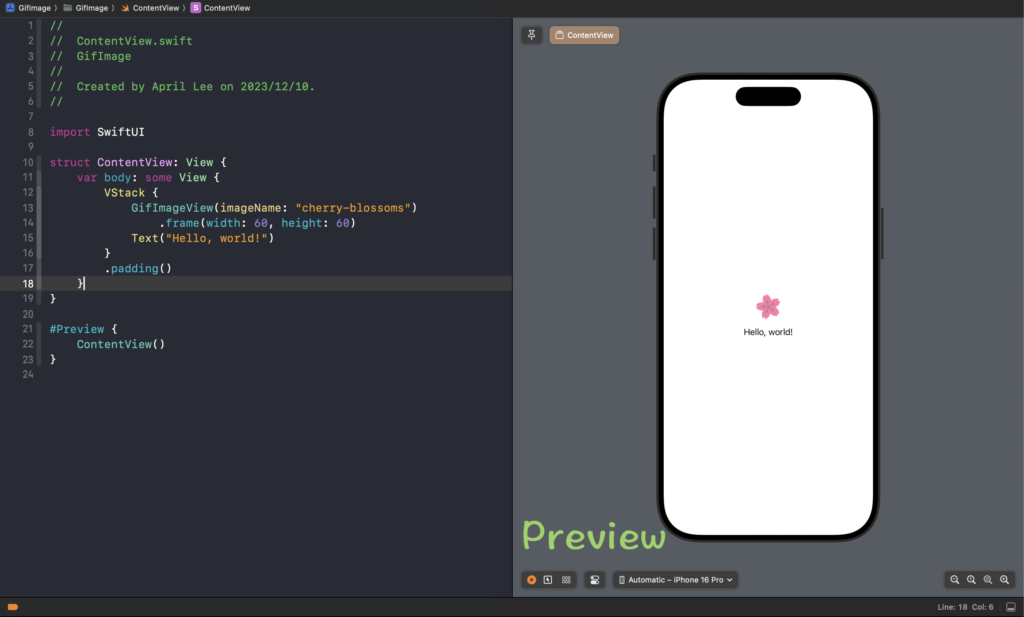
<p>在使用 SwiftUI 時，Xcode 畫面右邊這區就是 Preview畫面出現的地方，在 Xcode 裡是叫 Canvas，它是用來呈現寫在 <code>#Preview</code> 裡的程式碼，雖然不知道是不是大家都這樣，但我習慣叫它Preview 而不是 Canvas。實際上它也是把模擬器跑起來，所以若不是使用Apple 的 M 系列核心，會很難跑起來…</p>


<figure class="wp-block-image size-large"><img loading="lazy" decoding="async" width="1024" height="617" src="https://doeverythingiwant.com/wp-content/uploads/2025/02/Preview-1024x617.png" alt="" class="wp-image-2390" srcset="https://doeverythingiwant.com/wp-content/uploads/2025/02/Preview-1024x617.png 1024w, https://doeverythingiwant.com/wp-content/uploads/2025/02/Preview-300x181.png 300w, https://doeverythingiwant.com/wp-content/uploads/2025/02/Preview-768x463.png 768w, https://doeverythingiwant.com/wp-content/uploads/2025/02/Preview-1536x926.png 1536w, https://doeverythingiwant.com/wp-content/uploads/2025/02/Preview-2048x1234.png 2048w, https://doeverythingiwant.com/wp-content/uploads/2025/02/Preview-1920x1157.png 1920w, https://doeverythingiwant.com/wp-content/uploads/2025/02/Preview-1170x705.png 1170w, https://doeverythingiwant.com/wp-content/uploads/2025/02/Preview-585x353.png 585w" sizes="(max-width: 1024px) 100vw, 1024px" /></figure>


<h2 class="wp-block-heading">Preview的一些問題</h2>


<p>Preview 算是可以即時顯示出程式碼修改後的結果，是真的很方便，但是有時候也是會跑不出來，當然語法寫錯或是有些資料沒有給它(Preview 使用到得資料需要寫在 <code>#Preview</code> 裡，它是獨立的)，就無法顯示出來。這樣的問題可以檢查一下基本上就可以解決了，但有時候就是明明沒什麼問題，但一直轉半天畫面都沒有出現。</p>


<p>在個人經驗裡有二個情況比較容易發生</p>


<ul class="wp-block-list">
<li>在二、三個專案中切換</li>


<li>在不同的Git branch 中切換</li>
</ul>


<p>實作過程中難免會需要在不同的專案或不同的 Branch 中切換，就可能會<strong>遇到上一秒還顯示出現，下一秒就顯示不出來</strong>情況。</p>


<h2 class="wp-block-heading">解決方式</h2>


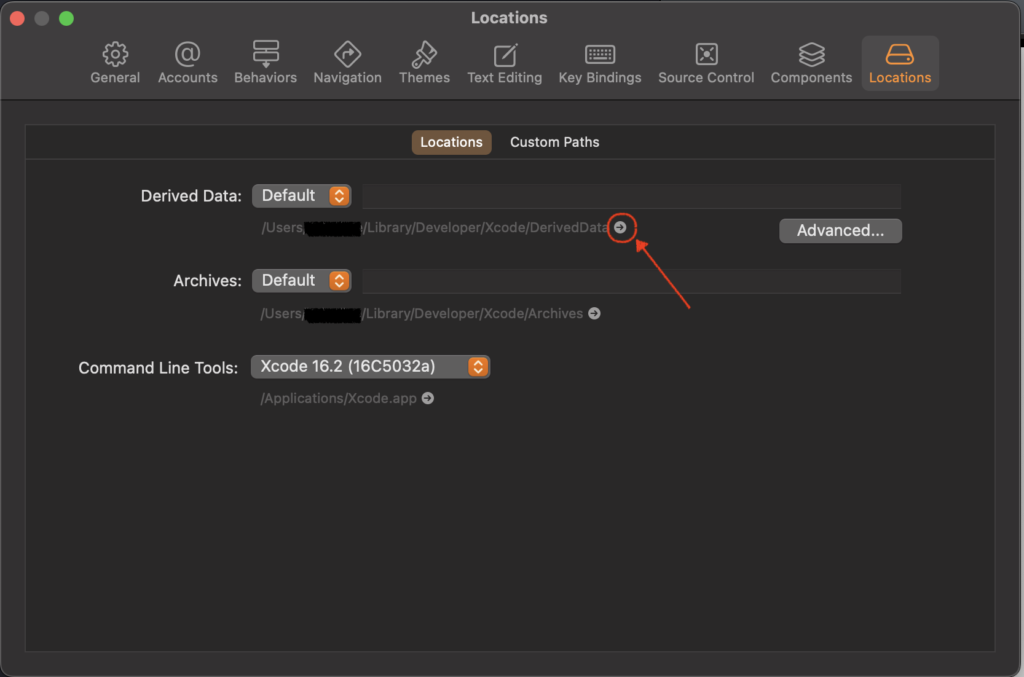
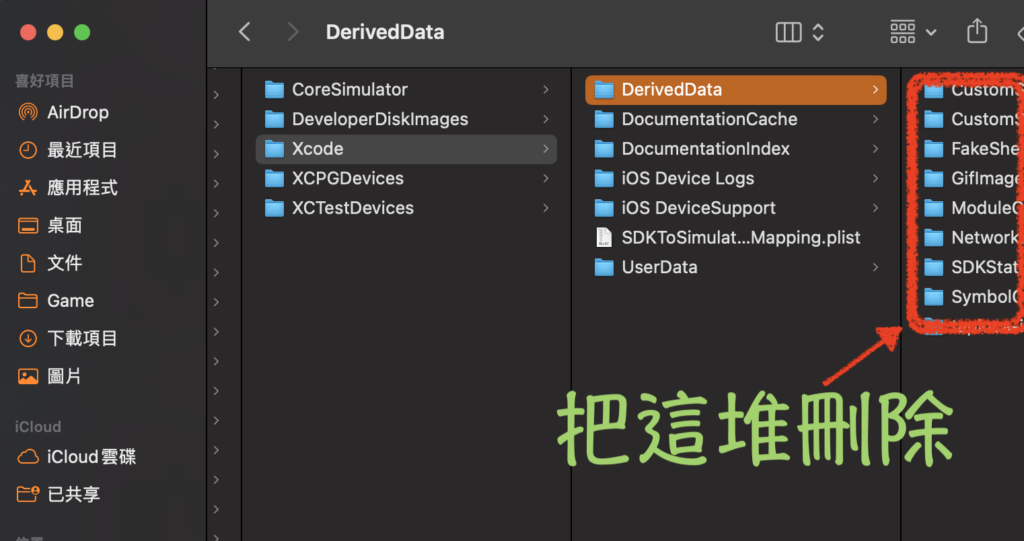
<p>如果是在同一個專案發生這個情況可以先試試 <strong>Clear Build + Delete DerivedData </strong>，也許就可以解決這個問題，但如果怎麼樣都無法解決的話，可以試試下面方式。</p>


<p>順便提一下，想刪除 <strong>DerivedData</strong> 可以從下圖開啟資料夾，再把資料夾裡的東西全丟到垃圾筒即可</p>


<figure class="wp-block-image size-large"><img loading="lazy" decoding="async" width="1024" height="677" src="https://doeverythingiwant.com/wp-content/uploads/2025/02/0201-1024x677.png" alt="" class="wp-image-2392" srcset="https://doeverythingiwant.com/wp-content/uploads/2025/02/0201-1024x677.png 1024w, https://doeverythingiwant.com/wp-content/uploads/2025/02/0201-300x198.png 300w, https://doeverythingiwant.com/wp-content/uploads/2025/02/0201-768x508.png 768w, https://doeverythingiwant.com/wp-content/uploads/2025/02/0201-1536x1016.png 1536w, https://doeverythingiwant.com/wp-content/uploads/2025/02/0201-1170x774.png 1170w, https://doeverythingiwant.com/wp-content/uploads/2025/02/0201-780x516.png 780w, https://doeverythingiwant.com/wp-content/uploads/2025/02/0201-585x387.png 585w, https://doeverythingiwant.com/wp-content/uploads/2025/02/0201-263x175.png 263w, https://doeverythingiwant.com/wp-content/uploads/2025/02/0201.png 1666w" sizes="(max-width: 1024px) 100vw, 1024px" /></figure>


<figure class="wp-block-image size-large"><img loading="lazy" decoding="async" width="1024" height="541" src="https://doeverythingiwant.com/wp-content/uploads/2025/02/02012-1024x541.png" alt="" class="wp-image-2393" srcset="https://doeverythingiwant.com/wp-content/uploads/2025/02/02012-1024x541.png 1024w, https://doeverythingiwant.com/wp-content/uploads/2025/02/02012-300x158.png 300w, https://doeverythingiwant.com/wp-content/uploads/2025/02/02012-768x406.png 768w, https://doeverythingiwant.com/wp-content/uploads/2025/02/02012-1170x618.png 1170w, https://doeverythingiwant.com/wp-content/uploads/2025/02/02012-585x309.png 585w, https://doeverythingiwant.com/wp-content/uploads/2025/02/02012.png 1522w" sizes="(max-width: 1024px) 100vw, 1024px" /></figure>


<p>剛剛有說到，其實Preview 也是跑模擬器，所以直接全部刪除讓它們重新產生，就和<strong>Delete DerivedData</strong> 的作法差不多，因為不確定到底是什麼問題就直接全刪，和「重開機治百病」一樣的感覺 <img src="https://s.w.org/images/core/emoji/17.0.2/72x72/1f642.png" alt="🙂" class="wp-smiley" style="height: 1em; max-height: 1em;" /></p>


<p>首先，開啟Terminal，不需要移動到其他位置，然後輸入以下指令</p>


<pre class="wp-block-code"><code>xcrun simctl --set previews delete unavailable</code></pre>


<p>會需要跑一點點時間，跑完之後會出現以下文字</p>


<pre class="wp-block-code"><code>Using Previews Device Set: '/Users/userName/Library/Developer/Xcode/UserData/Previews/Simulator Devices'</code></pre>


<p>這樣當你重新開啟 Xcode 之後，Preview 的模擬器就會再重新Create，這樣也許可以解決 Preview 轉半天沒有出現的情況。</p>


<p>希望這個方式能有幫助~</p>


<p>最後，祝大家 Coding 愉快!!</p>


<p></p>
]]></content>
		
					<link rel="replies" type="text/html" href="https://doeverythingiwant.com/ios-xcode-preview-trouble-shootings/#comments" thr:count="0" />
			<link rel="replies" type="application/atom+xml" href="https://doeverythingiwant.com/ios-xcode-preview-trouble-shootings/feed/atom/" thr:count="0" />
			<thr:total>0</thr:total>
			</entry>
		<entry>
		<author>
			<name>艾普利</name>
							<uri>https://doeverythingiwant.com</uri>
						</author>

		<title type="html"><![CDATA[[iOS] Codable 有關的那些小事情]]></title>
		<link rel="alternate" type="text/html" href="https://doeverythingiwant.com/codable-decoder/" />

		<id>https://doeverythingiwant.com/?p=2372</id>
		<updated>2024-12-08T08:11:48Z</updated>
		<published>2024-12-08T08:11:47Z</published>
		<category scheme="https://doeverythingiwant.com" term="寫程式" /><category scheme="https://doeverythingiwant.com" term="codable" /><category scheme="https://doeverythingiwant.com" term="Decoder" /><category scheme="https://doeverythingiwant.com" term="iOS" />
		<summary type="html"><![CDATA[說到 Codable 已經推出很久了，也用了好幾年了，但是對它還是不算是很了解，該怎麼說呢，因為Codable 最常運用在解析 API Response，基本上寫完之後，除非API 回傳值要改變，你大概到離職的那一刻都不會再去修改它了，所以即使它推出了很多年了，實際上接觸的時間意外地少。
最近正好有機會再次寫不少 Codable 的部分，發現了一些過去不知道的東西，把它們記錄在這裡。]]></summary>

					<content type="html" xml:base="https://doeverythingiwant.com/codable-decoder/"><![CDATA[
<p class="has-text-align-center">Photo by <a href="https://unsplash.com/@markusspiske?utm_content=creditCopyText&amp;utm_medium=referral&amp;utm_source=unsplash" target="_blank" rel="noopener">Markus Spiske</a> on <a href="https://unsplash.com/photos/matrix-movie-still-iar-afB0QQw?utm_content=creditCopyText&amp;utm_medium=referral&amp;utm_source=unsplash" target="_blank" rel="noopener">Unsplash</a></p>


<p>說到 Codable 已經推出很久了，也用了好幾年了，但是對它還是不算是很了解，該怎麼說呢，因為Codable 最常運用在解析 API Response，基本上寫完之後，除非API 回傳值要改變，大概到離職的那一刻都不會再去修改它了，所以即使它推出了很多年了，實際上接觸的時間意外地少。</p>


<p>最近正好有機會再次寫不少 Codable 的部分，發現了一些過去不知道的東西，把它們記錄在這裡。</p>


<span id="more-2372"></span>


<h2 class="wp-block-heading">CodingKey</h2>


<p>最常使用在API 回傳值的Key 風格 不是 Swift 習慣的風格，做為對應解析之用</p>


<div class="hcb_wrap"><pre class="prism line-numbers lang-swift" data-lang="Swift"><code>enum CodingKeys: String, CodingKey {
    case id = &quot;product_id&quot;
    case name
    case description
    case expiryDate = &quot;expiry_date&quot;
}</code></pre></div>


<p>在API 回傳值裡的 <code>product_id</code> 就會被放到 <code>id</code>裡，這是非常好用的地方。</p>


<p>另一個好用的地方在於也可以讓decoder只解析寫在 CodingKeys 裡的那些參數，舉個例</p>


<div class="hcb_wrap"><pre class="prism line-numbers lang-swift" data-lang="Swift"><code>struct SubItem: Decodable,Identifiable {
   var id = UUID().string
   var name: String
   var description: String
   var isActive: Bool
}</code></pre></div>


<p><code>SubItem</code> conform Identifiable protocol ，因此有一個參數是<code>id</code> 且還是直接使用UUID，並不希望它被拿來當解析用的參數時，就可以使用 CodingKey來避開 <code>id</code> ，就不需要再寫 <code>init(from decoder: any Decoder)</code></p>


<div class="hcb_wrap"><pre class="prism line-numbers lang-swift" data-lang="Swift"><code>struct SubItem: Decodable,Identifiable {
   var id = UUID().string
   var name: String
   var description: String
   var isActive: Bool

   enum CodingKeys: String, CodingKey {
    case name
    case description
    case isActive 
  }
}</code></pre></div>


<h2 class="wp-block-heading">Try? &amp; decodeIfPresent()</h2>


<p>基於因為不知道API 會回傳什麼，是否真的會依照文件回傳，為了讓App 不會因為回傳值問題需導至 Crash，一般而言，除非100%保証一定會有值的情況下，大多數參數都會被設定為 Optional，在解析的時候就會用上  <code>decodeIfPresent</code> ，當回傳值完全沒有這個參數，或是參數是nil(null)的時候，它會回傳 nil。</p>


<p>一般情況下，這樣就幾乎不會有什麼問題，但是，就是這個但是，當回傳值是有值的時候，但偏偏回傳的資料型態是錯誤的，這樣的寫法就還是會解析失敗，導致整個物件都會是nil。</p>


<p>如果你是覺得「為什麼會回傳資料型態不同的資料來啊? 這不合理啊」，沒錯，理解上不應該出現回傳值的資料有誤的情況，多數情況下都會要求修正。因為App 端對於資料型態相對來說是嚴格的，解析失敗最後就可能造成 Crash ，所以最好是大家都遵守好訂好的資料型態，不應該回傳不正確的型態。</p>


<p>在有點歷史的產品裡或是一開始就沒有 App 端產品就可能會發生，回傳值會變成不預期的資料型態問題，且可能也不是馬上可以修正的情況，這種時候就需要先確認有問題的資料是不是需要用的，若是需要用的就必須要再另外處理，若是不需要用的資料，就是<code>try?</code> 出馬的時候了!</p>


<p><code>try?</code> 本來就是在解析失敗的時候會回傳nil ，本來比較常會和 <code>decode</code>() 一起使用，如果和 <code>decodeIfPresent</code> 一起使用，所有可以會造成問題的情況都會包含到，這樣就比較不用怕因為資料型態解析失敗問題，當然，前提是有問題的資料並不是會使用到的資料</p>


<p>以下就是合體技的寫法</p>


<div class="hcb_wrap"><pre class="prism line-numbers lang-plain"><code>init(from decoder: any Decoder) throws {
   let container = try decoder.container(keyedBy: CodingKeys.self)
   id = try? container.decodeIfPresent(String.self, forKey: .id)
   name = try? container.decodeIfPresent(String.self, forKey: .name)
}</code></pre></div>


<h2 class="wp-block-heading">假如運氣特好遇到…</h2>


<p>萬一真的運氣特好遇到同一支API 回傳值在不同情況下某一個參數會回傳完全不同的型態，偏偏你又必須要使用這些參數，那只好自定義解析方式了，方法上網Google 一下就會找得到了，不然也可以詢問 Claude AI. </p>


<p>其方式是 <code>extenstion KeyedDecodingContainer</code> 這個Struct ，寫一個通用的 <code>decode</code>，之後就可以利用這個 <code>decode</code> 為它加上一些自定義的解析方式</p>


<div class="hcb_wrap"><pre class="prism line-numbers lang-swift" data-lang="Swift"><code>func decodeAny&lt;T&gt;(_: T.Type, forKey key: K, transform: ((Any) -&gt; T?)? = nil) throws -&gt; T? {
        guard contains(key) else { return nil }
        
        //預設轉換邏輯
        let defaultTransform: (Any) -&gt; T? = { value in
            if let typedValue = value as? T {
                return typedValue
            }
            
            if let stringConvertible = T.self as? LosslessStringConvertible.Type {
                let stringValue = String(describing: value)
                return stringConvertible.init(stringValue) as? T
            }
            
            return nil
        }
        
        let transformer = transform ?? defaultTransform
        
        //不同型別的解法
        let attempts: [(Any.Type, (K) throws -&gt; Any)] = [
            (String.self, {try decode(String.self, forKey: $0) as Any}),
            (Int.self, {try decode(Int.self, forKey: $0) as Any}),
            (Double.self, {try decode(Double.self, forKey: $0) as Any}),
            (Bool.self, {try decode(Bool.self, forKey: $0) as Any})
        ]
        
        // value: 取得API 資料的型態,transformed: 利用transformer 解析成需要的型態
        for(_, decoder) in attempts {
            if let value = try? decoder(key),
               let transformed = transformer(value) {
                return transformed
            }
        }
    
        return nil
    }</code></pre></div>


<p>例如 <code>Bool</code> 是最常遇到擁有各種不同型態的表示法的，就可以為它來寫一個方便的解析方式</p>


<div class="hcb_wrap"><pre class="prism line-numbers lang-swift" data-lang="Swift"><code>func decodeBool(forKey key: K) throws -&gt; Bool? {
        try decodeAny(Bool.self, forKey: key) { value in
            switch value {
            case let boolValue as Bool:
                return boolValue
            case let intValue as Int:
                return intValue != 0
            case let doubleValue as Double:
                return doubleValue != 0
            case let stringValue as String:
                let lowercased = stringValue.lowercased()
                if [&quot;true&quot;, &quot;t&quot;, &quot;yes&quot;, &quot;1&quot;].contains(lowercased) { return true }
                if [&quot;false&quot;, &quot;f&quot;, &quot;no&quot;, &quot;0&quot;].contains(lowercased) { return false }
                return nil
            default nil
            }
        }
    }</code></pre></div>


<p>說真的，最好是不要遇到需要這樣寫的情況，為什麼呢? 主要的原因是萬一真的是 API 的錯誤，但因為App 端有自定義解析的方式，所以就解析成功了，那麼就可能完全不會有人知道可能真的是資料錯誤的問題，當這樣資料數量多了之後，也許就會造成後續資料分析有誤，或有些神奇的情況。</p>


<p>最後，祝大家 Coding 愉快!!</p>
]]></content>
		
					<link rel="replies" type="text/html" href="https://doeverythingiwant.com/codable-decoder/#comments" thr:count="0" />
			<link rel="replies" type="application/atom+xml" href="https://doeverythingiwant.com/codable-decoder/feed/atom/" thr:count="0" />
			<thr:total>0</thr:total>
			</entry>
		<entry>
		<author>
			<name>艾普利</name>
							<uri>https://doeverythingiwant.com</uri>
						</author>

		<title type="html"><![CDATA[[iOS] Network Monitor]]></title>
		<link rel="alternate" type="text/html" href="https://doeverythingiwant.com/ios-network-monitor/" />

		<id>https://doeverythingiwant.com/?p=2361</id>
		<updated>2024-10-20T14:25:19Z</updated>
		<published>2024-10-20T14:25:17Z</published>
		<category scheme="https://doeverythingiwant.com" term="寫程式" /><category scheme="https://doeverythingiwant.com" term="iOS" /><category scheme="https://doeverythingiwant.com" term="network monitor" /><category scheme="https://doeverythingiwant.com" term="SwiftUI" />
		<summary type="html"><![CDATA[Photo by Frederik Lipfert on U&#8230;]]></summary>

					<content type="html" xml:base="https://doeverythingiwant.com/ios-network-monitor/"><![CDATA[
<p class="has-text-align-center">Photo by <a href="https://unsplash.com/@frederikli?utm_content=creditCopyText&amp;utm_medium=referral&amp;utm_source=unsplash" target="_blank" rel="noopener">Frederik Lipfert</a> on <a href="https://unsplash.com/photos/a-person-holding-an-iphone-in-their-hand-y67dwfB2AiM?utm_content=creditCopyText&amp;utm_medium=referral&amp;utm_source=unsplash" target="_blank" rel="noopener">Unsplash</a></p>


<p>在iOS12之前想要偵測網路狀態的話，大家都會使用 Reachability 這套官方工具，且有 <a href="https://developer.apple.com/library/archive/samplecode/Reachability/Introduction/Intro.html" data-type="link" data-id="https://developer.apple.com/library/archive/samplecode/Reachability/Introduction/Intro.html" target="_blank" rel="noreferrer noopener">Demo Code</a> 可以直接使用，所以只要說到偵測網路第一時間一定會想到使用 Reachability。</p>


<p>在 iOS 12之後官方推出了 <a href="https://developer.apple.com/documentation/network" target="_blank" rel="noreferrer noopener">Network Kit</a> 其中有很多與網路相關的服務，期中一個就可以用來偵測網路狀態，程式碼比過去少又比較清楚，配合現在官方主推的 SwiftUI 也很好用。</p>


<span id="more-2361"></span>


<h2 class="wp-block-heading">Monitor</h2>


<h3 class="wp-block-heading">Create Publisher</h3>


<p>像這樣的Monitor 是建議獨立建立一個 Class 來處理，不要放在其他的Class 裡面</p>


<div class="hcb_wrap"><pre class="prism line-numbers lang-swift" data-lang="Swift"><code>import Network

class NetworkMonitor: ObservableObject {
    
    @Published private(set) var isConnected: Bool = false
    @Published private(set) var networkType: NWInterface.InterfaceType? = .other
}</code></pre></div>


<p>首先，記得要 <code>import Network</code>，為了能讓SwiftUI 使用記得要Conform <code>ObservableObject</code></p>


<p><code>isConnected</code> 就是在確認是否為連線狀態，<code>networkType</code> 就是屬於那一種連線類型，官方有分為 <code>wifi</code>、<code>cellular</code>…等等，詳細分類可以參考 <a href="https://developer.apple.com/documentation/network/nwinterface/interfacetype" target="_blank" rel="noreferrer noopener">NWInterface.InterfaceType</a> 的說明。</p>


<h3 class="wp-block-heading">Create Monitor</h3>


<div class="hcb_wrap"><pre class="prism line-numbers lang-swift" data-lang="Swift"><code>let networkMonitor = NWPathMonitor()
let workQueue = DispatchQueue(label: &quot;NetworkMonitor&quot;)</code></pre></div>


<p>接著往下建立 Monitor ，在Network Kit 裡有一個Class 是 <a href="https://developer.apple.com/documentation/network/nwpathmonitor" data-type="link" data-id="https://developer.apple.com/documentation/network/nwpathmonitor" target="_blank" rel="noreferrer noopener">NWPathMonitor</a> ，它就是用來偵測網路狀態的，上述這樣的寫法表示要偵測所有型態的網路，有需要的話也可以指定想要偵測的網路型態。</p>


<p>一般來說偵測網路的動作一定不可以影響到主線程的運行，因此我們需要新增一條負責偵測網路用的 <code>DispatchQueue</code>，名稱可以自訂，這裡是稱它為 <code>NetworkMonitor</code>。</p>


<h3 class="wp-block-heading">Create Path update handler</h3>


<div class="hcb_wrap"><pre class="prism line-numbers lang-swift" data-lang="Swift"><code>networkMonitor.pathUpdateHandler = { [weak self] path in
    self?.isConnected = path.status == .satisfied
    self?.networkType = path.availableInterfaces.first?.type
}</code></pre></div>


<p>當網路狀態改變的時候，可以在 <code>pathUpdateHandler</code> 這個 Closure 取得資訊，會回傳 <code>NWPath</code> 這個物件，它有網路狀態的相關資訊。</p>


<h3 class="wp-block-heading">Start</h3>


<div class="hcb_wrap"><pre class="prism line-numbers lang-swift" data-lang="Swift"><code>networkMonitor.start(queue: workQueue)</code></pre></div>


<p>最後再開始偵測，記得指定先前設定好的Queue</p>


<p>完整的程式如下</p>


<div class="hcb_wrap"><pre class="prism line-numbers lang-swift" data-lang="Swift"><code>class NetworkMonitor: ObservableObject {
    
    @Published private(set) var isConnected: Bool = false
    @Published private(set) var networkType: NWInterface.InterfaceType? = .other
    
    let networkMonitor = NWPathMonitor()
    let workQueue = DispatchQueue(label: &quot;NetworkMonitor&quot;)
    
    init() {
        
        networkMonitor.pathUpdateHandler = { [weak self] path in
            self?.isConnected = path.status == .satisfied
            self?.networkType = path.availableInterfaces.first?.type
        }
        
        networkMonitor.start(queue: workQueue)
    }
}</code></pre></div>


<h3 class="wp-block-heading">View</h3>


<p>接著就可以將這個NetworkMonitor 放到View 上使用，以下是一個簡單的範例</p>


<div class="hcb_wrap"><pre class="prism line-numbers lang-swift" data-lang="Swift"><code>struct ContentView: View {
    
    @StateObject var networkMonitor = NetworkMonitor()
    
    var body: some View {
        VStack {
            Label {
                Text(networkMonitor.isConnected ? &quot;Connected&quot; : &quot;Disconnected&quot;)
            } icon: {
                Image(systemName: networkMonitor.isConnected ? &quot;network&quot; : &quot;network.slash&quot;)
                    .foregroundStyle(networkMonitor.isConnected ? .green : .red)
            }

        }
        .padding()
    }
}</code></pre></div>


<p>當然，App 應該只會有一個 Network Monitor ，這個時候可以使用 <code>EnvironmentObject</code> 的方式來傳遞 Network Monitor，寫法可以參考以下方式，當然要從哪裡開始建立 Network Monitor 都可以依照個人需求，理論上應該是App 開啟時就需要做偵測啦，記得使用 <code>.environmentObject()</code>來讓其他畫面可以使用 <code>EnvironmentObject</code> 方式讀取到 Network Monitor。</p>


<div class="hcb_wrap"><pre class="prism line-numbers lang-swift" data-lang="Swift"><code>@main
struct NetworkDemoApp: App {
    
    @StateObject var networkMonitor = NetworkMonitor()
    
    var body: some Scene {
        WindowGroup {
            ContentView()
                .environmentObject(networkMonitor)
        }
    }
}</code></pre></div>


<div class="hcb_wrap"><pre class="prism line-numbers lang-swift" data-lang="Swift"><code>struct ContentView: View {
    
    @EnvironmentObject var networkMonitor: NetworkMonitor
    
    var body: some View {
        VStack {
            Label {
                Text(networkMonitor.isConnected ? &quot;Connected&quot; : &quot;Disconnected&quot;)
            } icon: {
                Image(systemName: networkMonitor.isConnected ? &quot;network&quot; : &quot;network.slash&quot;)
                    .foregroundStyle(networkMonitor.isConnected ? .green : .red)
            }

        }
        .padding()
    }
}</code></pre></div>


<p>最後，祝大家 Coding 愉快!!</p>


<p></p>
]]></content>
		
					<link rel="replies" type="text/html" href="https://doeverythingiwant.com/ios-network-monitor/#comments" thr:count="0" />
			<link rel="replies" type="application/atom+xml" href="https://doeverythingiwant.com/ios-network-monitor/feed/atom/" thr:count="0" />
			<thr:total>0</thr:total>
			</entry>
		<entry>
		<author>
			<name>艾普利</name>
							<uri>https://doeverythingiwant.com</uri>
						</author>

		<title type="html"><![CDATA[[玩遊戲] 岐路旅人II(Octopath Traveler II) 遊玩心得2 -關於角色]]></title>
		<link rel="alternate" type="text/html" href="https://doeverythingiwant.com/octopathtraveler-character/" />

		<id>https://doeverythingiwant.com/?p=2307</id>
		<updated>2024-09-08T08:53:45Z</updated>
		<published>2024-09-08T08:53:43Z</published>
		<category scheme="https://doeverythingiwant.com" term="放輕鬆" /><category scheme="https://doeverythingiwant.com" term="Octopath Traveler II" />
		<summary type="html"><![CDATA[本來只想寫一篇的，但是發現光是8位角色文字就會有些多，再加上&#8230;]]></summary>

					<content type="html" xml:base="https://doeverythingiwant.com/octopathtraveler-character/"><![CDATA[
<p>本來只想寫一篇的，但是發現光是8位角色文字就會有些多，再加上圖，文章就會有點長，所以就拆成二篇來寫，這篇主要就是說一下我個人對這些角色的感覺</p>


<p>上一篇在這裡 <a href="https://doeverythingiwant.com/octopathtraveler2/">岐路旅人II (Octopath Traveler II)</a></p>


<span id="more-2307"></span>


<p>遊戲裡重要的八位主角，用我個人的主觀想法來談談他們吧~</p>


<h4 class="wp-block-heading">舞孃 &#8211; 亞格妮雅</h4>


<div class="wp-block-image">
<figure class="aligncenter size-large"><img loading="lazy" decoding="async" width="1024" height="576" src="https://doeverythingiwant.com/wp-content/uploads/2024/09/IMG_0059-1024x576.jpg" alt="" class="wp-image-2353" srcset="https://doeverythingiwant.com/wp-content/uploads/2024/09/IMG_0059-1024x576.jpg 1024w, https://doeverythingiwant.com/wp-content/uploads/2024/09/IMG_0059-300x169.jpg 300w, https://doeverythingiwant.com/wp-content/uploads/2024/09/IMG_0059-768x432.jpg 768w, https://doeverythingiwant.com/wp-content/uploads/2024/09/IMG_0059-1170x658.jpg 1170w, https://doeverythingiwant.com/wp-content/uploads/2024/09/IMG_0059-585x329.jpg 585w, https://doeverythingiwant.com/wp-content/uploads/2024/09/IMG_0059.jpg 1280w" sizes="(max-width: 1024px) 100vw, 1024px" /></figure>
</div>


<p>先從故事最歡樂的亞格妮雅開始~亞格妮雅是為了成為像媽媽一樣的巨星，而展開旅途，我是用神官開始遊戲，遇到亞格妮雅是從撿到一個滿滿地錢包開始…</p>


<p>亞格妮雅是個不是很在意細節的人，對，就是粗線條的人，但她不是笨(…應該吧…)只是對她來說什麼事情都可以有解決方法，沒有就自己創造一個，想法也很樂觀，不會因為一點挫折就倒地不起，當然也不是說她就沒有挫敗的時候，但她就是可以很快轉換心情，是個超級樂觀的人。</p>


<p>一開始看到這個角色的時候，對她沒有特別的感覺，也覺得她的故事好像沒什麼特別的，但真正開始玩她的故事的時候就改觀了。她比起其他的角色來說，確實沒有什麼非常戲劇性的發展，目標也是一般人都可以立定的目標，但是，就是這樣的感覺才適合她，帶給人們希望與歡樂的巨星，沒什麼戲劇性發展的故事，反而讓人覺得很舒服。</p>


<h4 class="wp-block-heading">獵人-歐修忒</h4>


<div class="wp-block-image">
<figure class="aligncenter size-large"><img loading="lazy" decoding="async" width="1024" height="576" src="https://doeverythingiwant.com/wp-content/uploads/2024/09/IMG_0058-1024x576.jpg" alt="" class="wp-image-2354" srcset="https://doeverythingiwant.com/wp-content/uploads/2024/09/IMG_0058-1024x576.jpg 1024w, https://doeverythingiwant.com/wp-content/uploads/2024/09/IMG_0058-300x169.jpg 300w, https://doeverythingiwant.com/wp-content/uploads/2024/09/IMG_0058-768x432.jpg 768w, https://doeverythingiwant.com/wp-content/uploads/2024/09/IMG_0058-1170x658.jpg 1170w, https://doeverythingiwant.com/wp-content/uploads/2024/09/IMG_0058-585x329.jpg 585w, https://doeverythingiwant.com/wp-content/uploads/2024/09/IMG_0058.jpg 1280w" sizes="(max-width: 1024px) 100vw, 1024px" /></figure>
</div>


<p>要說第一印象最不看好的角色就是她了，雖然是獸人屬性，但就是不知道為什麼不會喜歡她，但…是的，又是一位在玩過之後變得喜歡這個角色了。</p>


<p>歐修忒，身為杜杜赫赫島的守護者，雖然覺得這個責任對她來說太沉重，但她還是為了島上即將來臨的危機，出島去尋找傳說中的三大神獸。</p>


<p>歐修忒就是個認知正確的單純孩子，超．單．純到讓人覺得她很可愛的程度，完全沒有心機，在另一位心機重的神官來說是剋星啊，非常可愛的孩子，另一位學者也快把她當成是女兒來看了，事實上歐修忒也稱學者為老爸，有她的「隊伍對話」都特別可愛啊。但是她的技能我覺得很好用，戰鬥方面真的幫助很大。雖然單純也是會成長，即使離開了島，遇見很多不單純或為了私利去做事的人們，她也沒有因此喪失她的那份單純善良的心，讓人希望她永遠也不要喪失那份單純。</p>


<h4 class="wp-block-heading">商人-帕爾特提歐</h4>


<div class="wp-block-image">
<figure class="aligncenter size-large"><img loading="lazy" decoding="async" width="1024" height="576" src="https://doeverythingiwant.com/wp-content/uploads/2024/09/IMG_0054-1024x576.jpg" alt="" class="wp-image-2349" srcset="https://doeverythingiwant.com/wp-content/uploads/2024/09/IMG_0054-1024x576.jpg 1024w, https://doeverythingiwant.com/wp-content/uploads/2024/09/IMG_0054-300x169.jpg 300w, https://doeverythingiwant.com/wp-content/uploads/2024/09/IMG_0054-768x432.jpg 768w, https://doeverythingiwant.com/wp-content/uploads/2024/09/IMG_0054-1170x658.jpg 1170w, https://doeverythingiwant.com/wp-content/uploads/2024/09/IMG_0054-585x329.jpg 585w, https://doeverythingiwant.com/wp-content/uploads/2024/09/IMG_0054.jpg 1280w" sizes="(max-width: 1024px) 100vw, 1024px" /></figure>
</div>


<p>全世界的商人都應該要認識他啊，他根本就是商人的楷模啊!! 帕爾特提歐出身在商人世家，立志要成為一位帶給大家幸福的商人，一開始我不太懂商人要怎麼帶給人幸福?商人不就是為了要把別人的錢變成自己的嗎?之後再看到帕爾特提歐所做所為，才了解他理想中商人帶給人們幸福的方式，說真的有些公司產品理念確實很像帕爾特提歐想做的，而那些公司也確實成了在世界上數一數二的大公司。</p>


<p>身為商人的他眼光很好，唯有他有特別的支線任務，基本上都是和商機有關的任務，內容都很有趣，當時在玩的時候沒有發現但其中一個支線任務直接關係到主線，那個支線任務也是前期比較難達成的任務，我自己是解完支線之後才跑主線，所以完全沒有影響。</p>


<p>最喜歡帕爾特提歐的技能就是可以靠著NPC 殺價啊!!! 商人就是要有這個固有技能才能叫做商人啊!!此外我特別喜歡他的個性，為人豪爽又很照顧人，真心會想和他當朋友的。</p>


<h4 class="wp-block-heading">劍士-光</h4>


<figure class="wp-block-image size-large"><img loading="lazy" decoding="async" width="1024" height="576" src="https://doeverythingiwant.com/wp-content/uploads/2024/09/IMG_0061-1024x576.jpg" alt="" class="wp-image-2352" srcset="https://doeverythingiwant.com/wp-content/uploads/2024/09/IMG_0061-1024x576.jpg 1024w, https://doeverythingiwant.com/wp-content/uploads/2024/09/IMG_0061-300x169.jpg 300w, https://doeverythingiwant.com/wp-content/uploads/2024/09/IMG_0061-768x432.jpg 768w, https://doeverythingiwant.com/wp-content/uploads/2024/09/IMG_0061-1170x658.jpg 1170w, https://doeverythingiwant.com/wp-content/uploads/2024/09/IMG_0061-585x329.jpg 585w, https://doeverythingiwant.com/wp-content/uploads/2024/09/IMG_0061.jpg 1280w" sizes="(max-width: 1024px) 100vw, 1024px" /></figure>


<p>東方風格的小光!!本身是劍術高強的皇子，一開始以為是正經八百的皇子，但他其中一個固有技能是用錢收買人打聽消息，懂得用錢收買人，這點讓我的好感度上升很多，畢竟太過於正經八百或善良並無法成為好的領導者，要適時地利用適宜的人事物才是領導者!!</p>


<p>光的故事很王道，就是為了改變目前只為了現在充滿腥風血雨國家，為了找到可靠伙伴展開旅行，王道很好啊!!真的。其實光身上也有一個他必須克服的事情，無法逃離只能面對的事情。</p>


<p>光，怎麼說呢~就是很有皇子的感覺(廢話)，也可以在他身上看到他真心為自己國家著想，想為百姓的生活負責，<s>快叫那些政治家來看一看什麼是為國家好的理念啊!</s> 為了國家可以負出很多，光也很能接受各種不同意見，在「隊伍對話」也可以看到，他真心覺得某些事情很好，又願意接受不同想法的樣子，天啊，完全就是可以成為好國王的樣子啊!</p>


<h4 class="wp-block-heading">學者-歐茲巴德</h4>


<figure class="wp-block-image size-large"><img loading="lazy" decoding="async" width="1024" height="576" src="https://doeverythingiwant.com/wp-content/uploads/2024/09/IMG_0057-1024x576.jpg" alt="" class="wp-image-2355" srcset="https://doeverythingiwant.com/wp-content/uploads/2024/09/IMG_0057-1024x576.jpg 1024w, https://doeverythingiwant.com/wp-content/uploads/2024/09/IMG_0057-300x169.jpg 300w, https://doeverythingiwant.com/wp-content/uploads/2024/09/IMG_0057-768x432.jpg 768w, https://doeverythingiwant.com/wp-content/uploads/2024/09/IMG_0057-1170x658.jpg 1170w, https://doeverythingiwant.com/wp-content/uploads/2024/09/IMG_0057-585x329.jpg 585w, https://doeverythingiwant.com/wp-content/uploads/2024/09/IMG_0057.jpg 1280w" sizes="(max-width: 1024px) 100vw, 1024px" /></figure>


<p>一開場就在監獄裡的學者，一開始就是要想辨法逃獄。歐茲巴德是我覺得他的遭遇是最慘的，完全可以理解他為什麼會想復仇也覺得那位復仇對象真的是很可惡，只是為了復仇而活的人真的很可悲…</p>


<p>歐茲巴德就是很典型的研究狂學者，常常埋頭在自己的研究裡，不過他還是會記得家人，應該還算是好爸爸(?)的類型，歐修忒認証過的老爸，他們二個的「隊伍對話」有總爸爸對女兒沒輒的感覺，非常有趣。他也是許多人覺得可以當成開場角的角色，可能是因為可以使用三種屬性的魔法且是全體攻擊，也可以開場就探知一個弱點，對於重視破防的戰鬥來說很有用。</p>


<p>歐茲巴德給我的感覺呢…就是爸爸…啊…不是，打聽工具人(喂)，因為他的故事比較沉重一些，還是自己去感受比較好，說太多就會爆雷了。有一個支線故事和他有關，正確來說是協助他逃獄的人的小故事，看了其實有一點點感動，只可惜沒有更多的互動。</p>


<h4 class="wp-block-heading">藥師-卡絲蒂</h4>


<figure class="wp-block-image size-large"><img loading="lazy" decoding="async" width="1024" height="576" src="https://doeverythingiwant.com/wp-content/uploads/2024/09/IMG_0056-1024x576.jpg" alt="" class="wp-image-2350" srcset="https://doeverythingiwant.com/wp-content/uploads/2024/09/IMG_0056-1024x576.jpg 1024w, https://doeverythingiwant.com/wp-content/uploads/2024/09/IMG_0056-300x169.jpg 300w, https://doeverythingiwant.com/wp-content/uploads/2024/09/IMG_0056-768x432.jpg 768w, https://doeverythingiwant.com/wp-content/uploads/2024/09/IMG_0056-1170x658.jpg 1170w, https://doeverythingiwant.com/wp-content/uploads/2024/09/IMG_0056-585x329.jpg 585w, https://doeverythingiwant.com/wp-content/uploads/2024/09/IMG_0056.jpg 1280w" sizes="(max-width: 1024px) 100vw, 1024px" /></figure>


<p>失憶的藥師，一開始完全不知道自己是誰，也不知道自己發生了什麼事，依照自己的隨身小包了解自己是名藥師，為了找回記憶開始了旅程。卡絲蒂雖然失去了記憶，但是救人的理念還是沒有忘記，在旅行的過程中也慢慢地找回了記憶，也發現了失憶的原因…</p>


<p>卡絲蒂非常看重人命的藥師，總是以病患為優先，只要有希望就會盡全去醫治，感覺就是很容易過勞的類型，也會關心其他角色的情況，也許是因為卡絲蒂本身就很溫柔，因此她的周遭也都有許多溫柔的事情，也可以看出其他角色溫柔的一面，與她相關的「隊伍對話」也總是有溫柔的感覺。</p>


<p>她的主武器是斧頭，該怎麼說呢?如果在病患面前拿出斧頭，應該沒有人會不聽話吧 XD ，在她的章節裡有一些事情並不會完全說明白，結束的時候會留有疑點，有一種不是很爽快的感覺，但也是解決了卡絲蒂面對的最重要的問題。</p>


<h4 class="wp-block-heading">盜賊-索洛涅</h4>


<figure class="wp-block-image size-large"><img loading="lazy" decoding="async" width="1024" height="576" src="https://doeverythingiwant.com/wp-content/uploads/2024/09/IMG_0055-1024x576.jpg" alt="" class="wp-image-2348" srcset="https://doeverythingiwant.com/wp-content/uploads/2024/09/IMG_0055-1024x576.jpg 1024w, https://doeverythingiwant.com/wp-content/uploads/2024/09/IMG_0055-300x169.jpg 300w, https://doeverythingiwant.com/wp-content/uploads/2024/09/IMG_0055-768x432.jpg 768w, https://doeverythingiwant.com/wp-content/uploads/2024/09/IMG_0055-1170x658.jpg 1170w, https://doeverythingiwant.com/wp-content/uploads/2024/09/IMG_0055-585x329.jpg 585w, https://doeverythingiwant.com/wp-content/uploads/2024/09/IMG_0055.jpg 1280w" sizes="(max-width: 1024px) 100vw, 1024px" /></figure>


<p>偷遍全世界的索洛涅，是「黑蛇盜賊團」的一員，想要離開「蛇」獲取自由，但因為每位蛇的脖子上都有無法自行解除的項圈，想要解開項圈唯有取得「教母」與「教父」手中的鑰匙才行，為了拿到鑰匙，索洛涅展開追尋「教母」與「教父」的旅程。</p>


<p>索洛涅看似個性冷血，但是她對待狗狗很有愛心，她希望能自由自在的生活，可以理解她其實不是這麼壞的人，不過因為是在盜賊團長大的，殘忍的事情一定是沒有少做。她的故事真的有不少驚奇的地方，看到最後才會知道原來OOO是OOO，那她做的事情不就是OOO。</p>


<p>故事裡不斷出現一個問題「有一種寶物是盜賊絕對偷不到的，你認為是什麼?」，這個問題很有趣，有實體就一定可以偷到，所以可以猜到一定不是實體的東西，這樣答案就會有各式各樣，且就算是同一個人在不同的時期答案也會不一樣，完全就是看你重視什麼，這個問題也值得玩家思考。</p>


<h4 class="wp-block-heading">神官-特梅諾思</h4>


<figure class="wp-block-image size-large"><img loading="lazy" decoding="async" width="1024" height="576" src="https://doeverythingiwant.com/wp-content/uploads/2024/09/IMG_0060-1024x576.jpg" alt="" class="wp-image-2351" srcset="https://doeverythingiwant.com/wp-content/uploads/2024/09/IMG_0060-1024x576.jpg 1024w, https://doeverythingiwant.com/wp-content/uploads/2024/09/IMG_0060-300x169.jpg 300w, https://doeverythingiwant.com/wp-content/uploads/2024/09/IMG_0060-768x432.jpg 768w, https://doeverythingiwant.com/wp-content/uploads/2024/09/IMG_0060-1170x658.jpg 1170w, https://doeverythingiwant.com/wp-content/uploads/2024/09/IMG_0060-585x329.jpg 585w, https://doeverythingiwant.com/wp-content/uploads/2024/09/IMG_0060.jpg 1280w" sizes="(max-width: 1024px) 100vw, 1024px" /></figure>


<p>來啦!壞心眼的神官!特梅諾思，還有聲優加成好感度!特梅若思其實不是一般的神官，真正的職位是「異端審問官」主要工作就是去懷疑所有事物，在發生了一件充滿謎團的事件之後，他為了找出真相而展開了旅行。</p>


<p>我是覺得特梅諾思的故事真的是很黑暗啊，每章都會解開了一點謎團，總覺得要走到核心了，然後就出現了另一個謎團，就是一個推理劇的感覺，也許是因為故事有點悶，所以裡面有一個很可愛的角色-克里克，一直被特梅諾思欺負，欺負到其中一個「隊伍對話」就有人叫他不要一直欺負他，特梅諾思還回答「因為他的反應很有趣…所以…」，啊…是可以理解特梅諾思啦…</p>


<p>特梅諾思是大家不推開場的角色，主要是因為他物攻弱且只有光屬性的魔法，初期會比較難打。雖然我是沒有感覺啦?主要是因為有愛!!不是啦，有愛確實有點用，但其實我序章結束後就跑去找其他角色，特梅諾思開場附近的地圖，怪都是他可以處理的，當然走到其他角色附近就會有其他屬性破防確實有些難，只是等級夠高就沒問題了(聖光打到底!)，所以我到是沒有覺得用他開場會比較難玩。</p>


<hr class="wp-block-separator has-alpha-channel-opacity"/>


<p>這8位角色都很有特色，個性也都很不同，在各自的主線中是無法感受到他們是在一起行動，雖然「隊伍對話」可以有一點點「啊…其他人還在」的感覺，但也不是很強烈。說真的也算是還好啦，畢竟本來就是他們各自的故事，其他人就只是配角，將視角集中在故事主角上，也是很合理的。</p>


<p>在玩遊戲之後，其實對於某些角色並沒有很喜歡，在玩了遊戲之後，除了有聲優加成的特梅諾思外，其他的角色我都喜歡上他們了，也很喜歡他們各自的BGM 都很好聽喔~</p>


<p>還沒有入手且喜歡JRPG的各位，可以等特價的時候買數位版喔，我覺得是不會後悔的遊戲!</p>


<p></p>
]]></content>
		
			</entry>
		<entry>
		<author>
			<name>艾普利</name>
							<uri>https://doeverythingiwant.com</uri>
						</author>

		<title type="html"><![CDATA[淡定工程師的日常- 面試的基本禮貌]]></title>
		<link rel="alternate" type="text/html" href="https://doeverythingiwant.com/interviewpoliteness/" />

		<id>https://doeverythingiwant.com/?p=2329</id>
		<updated>2024-08-06T15:31:17Z</updated>
		<published>2024-08-04T10:43:20Z</published>
		<category scheme="https://doeverythingiwant.com" term="淡定工程師的日常" /><category scheme="https://doeverythingiwant.com" term="日常" /><category scheme="https://doeverythingiwant.com" term="面試" />
		<summary type="html"><![CDATA[Photo by KAL VISUALS on Unspla&#8230;]]></summary>

					<content type="html" xml:base="https://doeverythingiwant.com/interviewpoliteness/"><![CDATA[
<p class="has-text-align-center">Photo by <a href="https://unsplash.com/@kalvisuals?utm_source=unsplash&amp;utm_medium=referral&amp;utm_content=creditCopyText" target="_blank" rel="noopener">KAL VISUALS</a> on <a href="https://unsplash.com/s/photos/mac?utm_source=unsplash&amp;utm_medium=referral&amp;utm_content=creditCopyText" target="_blank" rel="noopener">Unsplash</a></p>


<p>本故事中的出場人物全是虛構的，故事內容為 85%真實 + 15%虛構組成，如有雷同……………真的純屬巧合</p>


<span id="more-2329"></span>


<p>出場人物</p>


<p><mark style="background-color:rgba(0, 0, 0, 0);color:#048757" class="has-inline-color">菜鳥</mark> / 工程師</p>


<hr class="wp-block-separator has-alpha-channel-opacity"/>


<p><mark style="background-color:rgba(0, 0, 0, 0);color:#048757" class="has-inline-color">「前輩!!!!!!」撲上去抱住</mark></p>


<p>「……」</p>


<p><mark style="background-color:rgba(0, 0, 0, 0);color:#048757" class="has-inline-color">「前輩!! 我們好久沒有出場了!!」</mark></p>


<p>「……只是那傢伙想不到梗可以寫，才沒讓我們出場」抱住</p>


<p><mark style="background-color:rgba(0, 0, 0, 0);color:#048757" class="has-inline-color">「那傢伙? 咦!? 你…真的是前輩嗎? 難不成是太久沒有出場，人設變了嗎? 你居然抱住我了，沒有把我打飛?前輩是換人演了嗎?」</mark></p>


<p>「…欠揍!」</p>


<p><mark style="background-color:rgba(0, 0, 0, 0);color:#048757" class="has-inline-color">「嗚哇!前輩…你居然用腳踹我」(哭)</mark></p>


<p><mark style="background-color:rgba(0, 0, 0, 0);color:#048757" class="has-inline-color">「……前輩」</mark></p>


<p>「幹嘛?」</p>


<p><mark style="background-color:rgba(0, 0, 0, 0);color:#048757" class="has-inline-color">「你怎麼看起來很生氣…我…我應該沒有做什麼讓你生氣的事吧?」</mark></p>


<p>「你二話不說就撲上來抱我這件事」</p>


<p><mark style="background-color:rgba(0, 0, 0, 0);color:#048757" class="has-inline-color">「咦!!!…對不起」(失落)</mark></p>


<p>「……算了，我不是因為你才心情不好，是因為剛剛遇到一位沒禮貌的應徵者，面試完之後他還寫信給HR 說我不尊重他」</p>


<p><mark style="background-color:rgba(0, 0, 0, 0);color:#048757" class="has-inline-color">「咦! 前輩雖然每次說話都毒舌又冷血，但至少還會給人基本尊重啊!」</mark></p>


<p>「……欠打」(踢)</p>


<p><mark style="background-color:rgba(0, 0, 0, 0);color:#048757" class="has-inline-color">「嗚哇…痛…是說對方是怎樣沒禮貌啊?」</mark></p>


<p>「…你知道我們公司自從疫情之後就都視訊面試了吧?」</p>


<p><mark style="background-color:rgba(0, 0, 0, 0);color:#048757" class="has-inline-color">「嗯」</mark></p>


<p>「你覺得視訊面試基本的尊重是什麼?」</p>


<p><mark style="background-color:rgba(0, 0, 0, 0);color:#048757" class="has-inline-color">「嗯…在鏡頭前面穿著整齊?」</mark></p>


<p>「對，穿著整齊是一點，你知道剛剛那位面試者鏡頭開起來是斜角的，完全看不到他的正面，我的視線只能從下往上看他」</p>


<p><mark style="background-color:rgba(0, 0, 0, 0);color:#048757" class="has-inline-color">「咦? 電腦鏡頭不是都是在正面嗎? 啊?他是外接鏡頭嗎?」</mark></p>


<p>「不是，他用手機鏡頭…」</p>


<p><mark style="background-color:rgba(0, 0, 0, 0);color:#048757" class="has-inline-color">「耶?? 手機? 不是在面試嗎?」</mark></p>


<p>「啊…他把手機放在左手邊，所以看到的就是斜角視角，呵呵，他用專業麥克風還戴耳罩式耳機，要不是在面試，我還以為我是在看直播，呵呵呵呵」</p>


<p><mark style="background-color:rgba(0, 0, 0, 0);color:#048757" class="has-inline-color">「前輩?」</mark></p>


<p>「問了幾個基礎問題，回答的很模糊外，請他舉例還反問為什麼? 怎麼，有點經驗就不可以問基礎理論嗎? 舉例不行嗎?」</p>


<p><mark style="background-color:rgba(0, 0, 0, 0);color:#048757" class="has-inline-color">「前…輩?」</mark></p>


<p>「工作資歷10年以上，不懂我在問什麼不會問嗎? 還說什麼我說答案他就知道是什麼了，說我的問題不清不楚，不懂是不會問喔，10年以上資歷連這件事都不懂!!?」</p>


<p><mark style="background-color:rgba(0, 0, 0, 0);color:#048757" class="has-inline-color">「前輩…冷靜點…」</mark></p>


<p>「還好意思和HR抱怨，我不尊重他?啊??我才想問他知不知道「尊重」二個字要怎麼寫!」</p>


<p><mark style="background-color:rgba(0, 0, 0, 0);color:#048757" class="has-inline-color">「前輩…等等…你怎麼一直踢我啊…」</mark></p>


<p>「用手機就算了，還斜角，這就是他的尊．重!!」</p>


<p><mark style="background-color:rgba(0, 0, 0, 0);color:#048757" class="has-inline-color">「前輩!!不要再踢我的啦!! 我不是那位應徵者啦!」</mark></p>


<p>「10年以上資歷很強是吧!!啊??」</p>


<p><mark style="background-color:rgba(0, 0, 0, 0);color:#048757" class="has-inline-color">「前輩!!!」</mark></p>


<hr class="wp-block-separator has-alpha-channel-opacity"/>


<p><sup><mark style="background-color:rgba(0, 0, 0, 0);color:#048757" class="has-inline-color">「請大家面試的時候還是要有基本禮貌，尊重別人，別人才會尊重你，嗚…好痛…」</mark></sup></p>
]]></content>
		
			</entry>
		<entry>
		<author>
			<name>艾普利</name>
							<uri>https://doeverythingiwant.com</uri>
						</author>

		<title type="html"><![CDATA[[玩遊戲] 岐路旅人II (Octopath Traveler II) 遊玩心得]]></title>
		<link rel="alternate" type="text/html" href="https://doeverythingiwant.com/octopathtraveler2/" />

		<id>https://doeverythingiwant.com/?p=2300</id>
		<updated>2024-09-08T08:56:05Z</updated>
		<published>2024-07-28T13:36:49Z</published>
		<category scheme="https://doeverythingiwant.com" term="放輕鬆" /><category scheme="https://doeverythingiwant.com" term="Octopath Traveler II" /><category scheme="https://doeverythingiwant.com" term="岐路旅人" /><category scheme="https://doeverythingiwant.com" term="遊玩心得" />
		<summary type="html"><![CDATA[Lag很久的岐路旅人II，趁數位版特價的時候把它買回家玩，其&#8230;]]></summary>

					<content type="html" xml:base="https://doeverythingiwant.com/octopathtraveler2/"><![CDATA[
<p>Lag很久的岐路旅人II，趁數位版特價的時候把它買回家玩，其實發售前就有玩過試玩版了，但因為當時已經無法買實體版了，再加上還有其他遊戲等著玩，就想說等到特價的時候再來玩好了。</p>


<p>在岐路旅人一代剛推出的時候就已經有點興趣，很喜歡 HD-2D 的美術風格，不記得那時候為什麼沒有購買了，總之就是完美地錯過它，然後…二代就出了…</p>


<span id="more-2300"></span>


<p>先來個官方影片</p>


<figure class="wp-block-embed aligncenter is-type-video is-provider-youtube wp-block-embed-youtube wp-embed-aspect-16-9 wp-has-aspect-ratio"><div class="wp-block-embed__wrapper">
<iframe title="《歧路旅人II》最終宣傳影片" width="1170" height="658" src="https://www.youtube.com/embed/3mufvq2VNvw?feature=oembed" frameborder="0" allow="accelerometer; autoplay; clipboard-write; encrypted-media; gyroscope; picture-in-picture; web-share" referrerpolicy="strict-origin-when-cross-origin" allowfullscreen></iframe>
</div></figure>


<p>一開始在看 PV 的時候，一看到神官的聲優是石田彰時，立刻決定要用神官開始玩，下載試玩版的時候，當然就直接選了神官開始遊戲，雖然後來看大家討論，神官不是大家推薦的開場角色，但…那又怎樣，我就是要玩CV是石田彰的角色!!!</p>


<h2 class="wp-block-heading">故事</h2>


<p>故事發生在分為東西大陸的「索里斯帝亞」，過去由八位神祉打倒了邪神帶來了和平，而立場大不相同的八位主角，在這個大陸展開了各自的故事…</p>


<p>進入遊戲後必須要選擇八位主角之一開始遊戲，選定之後他/她就會變成你的主角，他/她會成為隊組中的第一位且不能更換，每位主角都有屬於自身的故事和自身的目的，之後可以自由選擇接下來想要找的其他角色或是進入角色的下一章節。</p>


<h2 class="wp-block-heading">玩法</h2>


<p>遊戲並沒有特別限制玩家要從那裡開始玩，主線想怎麼走，想去那張地圖只要你打得過要去哪裡都隨便你。</p>


<p>遊戲一開始就可以從世界地圖上看到角色們與下一章節的所在位置，不過沒有走過的地方，地圖會是一片白白的，特定的地標要自己去找才可以。</p>


<div class="wp-block-image">
<figure class="aligncenter size-large"><img loading="lazy" decoding="async" width="1024" height="576" src="https://doeverythingiwant.com/wp-content/uploads/2024/07/IMG_9950-1024x576.jpg" alt="" class="wp-image-2315" srcset="https://doeverythingiwant.com/wp-content/uploads/2024/07/IMG_9950-1024x576.jpg 1024w, https://doeverythingiwant.com/wp-content/uploads/2024/07/IMG_9950-300x169.jpg 300w, https://doeverythingiwant.com/wp-content/uploads/2024/07/IMG_9950-768x432.jpg 768w, https://doeverythingiwant.com/wp-content/uploads/2024/07/IMG_9950-1170x658.jpg 1170w, https://doeverythingiwant.com/wp-content/uploads/2024/07/IMG_9950-585x329.jpg 585w, https://doeverythingiwant.com/wp-content/uploads/2024/07/IMG_9950.jpg 1280w" sizes="(max-width: 1024px) 100vw, 1024px" /></figure>
</div>


<p>走在原野上的時候會隨機遇到敵人，戰鬥是採回合制，但誰可以先行動是看角色速度，敵人都有防禦值，必須要進行破防才能給較高的傷害，所以快速破防就成了戰鬥重點。</p>


<p>角色本身有特定主職業，之後在找到職業公會之後就可以學習副職業，除了八位角色的職業外還有隱藏職業，因為最多只有四人上戰場，所以副職業可以讓你有更多的攻擊方式，此外每位角色都有一些固有技能，在原野或城鎮上使用，像是打聽消息、竊取物品、收購物品、將NPC收為臨時戰鬥伙伴…等等，好好運用的話，可以解鎖很多東西，也可以得知 NPC 的一些小故事，有些是支線任務的重要資訊。</p>


<p>支線任務有些很有趣，有些不是只有一種解法，不過支線任務的提示有些是藏在對話裡，有些是曾經打聽過的消息裡，有些是需要把某些人帶在身邊，也有可能是現在還無法到達的地點，我個人認為提示都不是很明顯，不過，努力找找提示與解決方式也是一大樂趣。</p>


<p>遊戲場景有分白天與夜晚，二個時間出現的人事物都有不同，連 BGM 也不同，角色的固有技能在白天與夜晚也有不同，由於可以自由切換白天與夜晚，可以依照需要去切換，晚上出現的怪和白天出現的怪也不一樣，如果想要當寶X夢大師與特級廚師的話，就需要在同一個地點的白天與夜晚找尋想要的怪(食材)。</p>


<figure class="wp-block-image size-large"><img loading="lazy" decoding="async" width="1024" height="576" src="https://doeverythingiwant.com/wp-content/uploads/2024/07/IMG_9956-1024x576.jpg" alt="" class="wp-image-2317" srcset="https://doeverythingiwant.com/wp-content/uploads/2024/07/IMG_9956-1024x576.jpg 1024w, https://doeverythingiwant.com/wp-content/uploads/2024/07/IMG_9956-300x169.jpg 300w, https://doeverythingiwant.com/wp-content/uploads/2024/07/IMG_9956-768x432.jpg 768w, https://doeverythingiwant.com/wp-content/uploads/2024/07/IMG_9956-1170x658.jpg 1170w, https://doeverythingiwant.com/wp-content/uploads/2024/07/IMG_9956-585x329.jpg 585w, https://doeverythingiwant.com/wp-content/uploads/2024/07/IMG_9956.jpg 1280w" sizes="(max-width: 1024px) 100vw, 1024px" /></figure>


<p>聽說一代在角色與角色之間的互動性比較少，這一代就有加強了這點，在過角色章節時都有「隊伍對話」的小劇場，這可以讓你了解角色與角色之間的想法與互動，如果小劇場的出場角色在隊伍裡的話，在遊戲畫面上就會出現相對應的按鈕可以進行小劇場，錯過了或正好隊伍裡沒有相對應的角色，之後都可以在選單裡去看。小劇場的對話有些很有趣，可以讓你更加了解這個角色是怎麼樣的一個人。</p>


<h2 class="wp-block-heading">缺點</h2>


<p>沒有100%完美的遊戲，就算是3A大作也是會有缺點的，再來說一些我覺得的遊戲缺點</p>


<h4 class="wp-block-heading">慢熱</h4>


<p>JRPG 類型的遊戲，一般來說前期都是會比較難過一些，除了角色等級低、沒武、沒裝還沒錢，故事也為了鋪成之後的故事會比較沒有這麼精彩，岐路旅人裡有8位主角，每位主角都有自己的初章(也就是第一章)，雖然也是可以選擇先專心跑完一個人的故事再跑另一個人的，故事的時間線感覺有重疊，畢竟一開始選定一位角色之後，其他的角色的第一章就感覺用回顧的方式讓你知道他們發生什麼事情，交錯遊玩大家的同章節，我覺得比較能感受遊戲帶來的樂趣。</p>


<p>若是和我一樣是交錯遊玩的話，在跑其他人的第一章真的讓我覺得有那麼一點點懶，每天能遊玩的時間又不多，但不看又不知道他/她為什麼要展開旅程，看又覺得沒有進度，初期真的有點痛苦。</p>


<p>當然，只要撐過那段時期，遊玩體驗就完全大不同，故事愈到後面愈精彩。玩JRPG 就是要忍過前期會讓人發懶的時間</p>


<h4 class="wp-block-heading">等級差距</h4>


<p>這遊戲是角色沒有上場戰鬥就沒有經驗值的類型，這也沒什麼問題，因為很多遊戲都會這樣做，問題在於你選的第一個角色也就是被你選定的遊戲主角，會固定在隊伍裡無法更換。</p>


<p>想當然最後加入的角色等級與第一個角色一定會有差距，且很難追上，像我使用神官-特梅諾思開始玩，他的等級與其他人的等級平均差快20等。因為故事章節除了第一章外都有告訴你推薦等級，基本上每次都特梅諾思已經超過推薦等級，其他人還不到，這樣去打每章節的 Boss 其實會很辛苦，有很多章節我都還會刻意去練功，讓其他角色能升到快接近推薦等級，然後特梅諾思也會升級，雖然等級高要的經驗值也比較多，但因無法把他換下場，所以他的戰鬥次數最多，最後他與其他角色等級永遠有一段不少的距離。</p>


<figure class="wp-block-image size-large"><img loading="lazy" decoding="async" width="1024" height="576" src="https://doeverythingiwant.com/wp-content/uploads/2024/07/IMG_9943-1024x576.jpg" alt="" class="wp-image-2316" srcset="https://doeverythingiwant.com/wp-content/uploads/2024/07/IMG_9943-1024x576.jpg 1024w, https://doeverythingiwant.com/wp-content/uploads/2024/07/IMG_9943-300x169.jpg 300w, https://doeverythingiwant.com/wp-content/uploads/2024/07/IMG_9943-768x432.jpg 768w, https://doeverythingiwant.com/wp-content/uploads/2024/07/IMG_9943-1170x658.jpg 1170w, https://doeverythingiwant.com/wp-content/uploads/2024/07/IMG_9943-585x329.jpg 585w, https://doeverythingiwant.com/wp-content/uploads/2024/07/IMG_9943.jpg 1280w" sizes="(max-width: 1024px) 100vw, 1024px" /></figure>


<h4 class="wp-block-heading">地圖探索</h4>


<p>世界地圖一開始就會看到，但是沒去過的地方，除了角色下一章的發生地點會標示外，其他就什麼也沒有，必須要自己跑過才行，雖然不像是開發世界的遊戲，地圖大到光跑圖就覺得累，但是因為遇敵是踩地雷式，且如果沒有加裝技能的話，我覺得走不到幾步就會遇到敵人，是可以跑走沒錯，但沒有加裝技能的情況下不是100%就跑走，若沒有順利逃走，那回合等於就沒了，因為角色會無法正常行動，但敵人可以行動啊，因此增加了開地圖的難度。</p>


<p>好在進去過的城鎮之後是可以直接飛過去的，不用再走地圖，只是有一些特定的點是之後想要再回去的，如職業公會，雖然有標示在地圖上，但不能直接飛過去，只能先飛到比較靠近的城鎮再走過去，但走到的時候會發現不是自己想要找的職業公會的時候就會很…</p>


<p>再來是有些NPC 會在地圖上，但他們在的位置就算跑過了也不會標示在地圖上，只能自己記的一下大概位置，因為那些NPC 通常都身帶支線任務，有很高的機率要回來找他們，常常都是離開之後就不記得他們在哪裡，最後只好隨緣了。</p>


<hr class="wp-block-separator has-alpha-channel-opacity"/>


<p>當然，這個遊戲還是很好玩的，故事也很有趣，優點 &gt; 小缺點的情況下，還是很推薦遊玩的~像我到處亂走、解解支線、打打怪賺錢，一下子時間就過去2、3個小時了，主線完全沒有進度 XD</p>


<p>原本有寫了八位主角的部分，寫了之後發現文章會太長，直接再開一篇，會說說我對八位主角的想法~</p>


<figure class="wp-block-embed is-type-wp-embed"><div class="wp-block-embed__wrapper">
<blockquote class="wp-embedded-content" data-secret="ZtNYAn6cag"><a href="https://doeverythingiwant.com/octopathtraveler-character/">[玩遊戲] 岐路旅人II(Octopath Traveler II) 遊玩心得2 -關於角色</a></blockquote><iframe class="wp-embedded-content" sandbox="allow-scripts" security="restricted"  title="[玩遊戲] 岐路旅人II(Octopath Traveler II) 遊玩心得2 -關於角色 &#8212; 隨心所欲" src="https://doeverythingiwant.com/octopathtraveler-character/embed/#?secret=nAqfeqV7kO#?secret=ZtNYAn6cag" data-secret="ZtNYAn6cag" width="600" height="338" frameborder="0" marginwidth="0" marginheight="0" scrolling="no"></iframe>
</div></figure>
]]></content>
		
			</entry>
		<entry>
		<author>
			<name>艾普利</name>
							<uri>https://doeverythingiwant.com</uri>
						</author>

		<title type="html"><![CDATA[SwiftUI &#8211; Drop &#038; Drag List]]></title>
		<link rel="alternate" type="text/html" href="https://doeverythingiwant.com/swiftui-drop-drag-list/" />

		<id>https://doeverythingiwant.com/?p=2280</id>
		<updated>2024-06-09T10:41:04Z</updated>
		<published>2024-06-09T10:41:02Z</published>
		<category scheme="https://doeverythingiwant.com" term="寫程式" /><category scheme="https://doeverythingiwant.com" term="Drop and Drag" /><category scheme="https://doeverythingiwant.com" term="iOS" /><category scheme="https://doeverythingiwant.com" term="SwiftUI" />
		<summary type="html"><![CDATA[忘記是那一年的WWDC公布了一個拖曳相關的功能，主要是讓你可&#8230;]]></summary>

					<content type="html" xml:base="https://doeverythingiwant.com/swiftui-drop-drag-list/"><![CDATA[
<p>忘記是那一年的WWDC公布了一個拖曳相關的功能，主要是讓你可以將iPhone 的資料像是圖片之類的丟到iPad 或Mac 上，因此有了 API 可以用在 Drop &amp; Drag 動作上。</p>


<p>最近因為工作需要花了一些時間在研究Drop &amp; Drag 應該要怎麼寫，需要實作的是一般的拖拉元件改變它的順序，並不需要讓它能拖到另一個裝置上，寫作上就會比較簡單一點。</p>


<span id="more-2280"></span>


<p>參考以下文件與官方網站來練習</p>


<p><a href="https://dogpa0130.medium.com/swift-practice-177-swiftui-%E6%8B%96%E6%9B%B3-drop-drag-%E6%94%B9%E8%AE%8A%E9%99%A3%E5%88%97array%E4%BD%8D%E7%BD%AE-b63ff5edb935" target="_blank" rel="noreferrer noopener">Swift Practice # 177 SwiftUI 拖曳 Drop &amp; Drag 改變陣列Array位置</a></p>


<p><a href="https://mobileappsacademy.medium.com/drag-and-drop-list-in-swiftui-30b53682d447" target="_blank" rel="noreferrer noopener">Drag and Drop List in SwiftUI</a></p>


<p><a href="https://developer.apple.com/documentation/swiftui/drag-and-drop" target="_blank" rel="noreferrer noopener">Apple Documentation &#8211; Drag and Drop</a></p>


<hr class="wp-block-separator has-alpha-channel-opacity"/>


<h2 class="wp-block-heading">Start</h2>


<p>一開始當然要先做一個要進行拖曳的List，建立一個顯示各種茶的List</p>


<p>建立List 的 Item View</p>


<div class="hcb_wrap"><pre class="prism line-numbers lang-swift" data-lang="Swift"><code>struct TeaItemView: View {
    
    var title: String
    
    var body: some View {
        HStack {
            Text(title)
                .font(.system(size: 26))
        }
        .frame(maxWidth: .infinity)
        .padding(.vertical, 30)
        .background(.green)
        .clipShape(RoundedRectangle(cornerRadius: 20))
        
    }
}</code></pre></div>


<p>再建立一個用 <code>ForEach</code> 做的 List </p>


<div class="hcb_wrap"><pre class="prism line-numbers lang-swift" data-lang="Swift"><code>import SwiftUI

struct ContentView: View {
    
    @State private var draggedItem: String?
    @State private var fruitItems = [&quot;&#x1fad6; Tea&quot;, &quot; &#x2615; Coffee&quot;, &quot; &#x1f9c3; Juice&quot;, &quot;&#x1f9cb;Pearl milk tea&quot;, &quot;&#x1f95b; Milk&quot;, &quot;&#x1f379; Fruit tea&quot;, &quot;&#x1f9c9; Mate tea&quot;, &quot;&#x1f375; Matcha tea&quot;]
    
    var body: some View {
        
        ScrollView(showsIndicators: false) {
            VStack(spacing: 10) {
                ForEach(fruitItems, id: \.self) { fruit in
                    TeaItemView(title: fruit)
                }
            }
            .padding(.horizontal, 20)
        }
        .background(.black)
    }
}</code></pre></div>


<p><code>draggedItem</code> 是負責記錄要被拖曳的元件，再來Run 一下程式，會出現下面畫面</p>


<div class="wp-block-image">
<figure class="aligncenter size-full"><img loading="lazy" decoding="async" width="295" height="640" src="https://doeverythingiwant.com/wp-content/uploads/2024/06/teaList.gif" alt="" class="wp-image-2285"/></figure>
</div>


<h2 class="wp-block-heading">DrogDelegate</h2>


<p>如果要讓List 的元件可以被拖曳，必須實作 DropDelegate 這個Protocol，新增一個 DropDragDelegate 來實作它</p>


<div class="hcb_wrap"><pre class="prism line-numbers lang-swift" data-lang="Swift"><code>import SwiftUI

struct DropDrapDelegate: DropDelegate {
    
    let destinationItem: String
    
    @Binding var fruits: [String]
    @Binding var draggedItem: String?
    
    func dropUpdated(info: DropInfo) -&gt; DropProposal? {
        return DropProposal(operation: .move)
    }
    
    func performDrop(info: DropInfo) -&gt; Bool {
        draggedItem = nil
        return true
    }
    
    func dropEntered(info: DropInfo) {
        if let draggedItem {
            let fromIndex = fruits.firstIndex(of: draggedItem)
            if let fromIndex {
                let toIndex = fruits.firstIndex(of: destinationItem)
                if let toIndex, fromIndex != toIndex {
                    withAnimation {
                        self.fruits.move(fromOffsets: IndexSet(integer: fromIndex), toOffset: (toIndex &gt; fromIndex ? (toIndex + 1) : toIndex))
                    }
                }
            }
        }
    }
}</code></pre></div>


<p>在這個 Delegate 中有幾個需要實作的 function</p>


<p><code>func dropUpdated(info: DropInfo) -> DropProposal?</code>  </p>


<p>宣告這個拖曳是要什麼動作，以範例來說只是要做移動，所以是 <code>.move</code>，可以去官方文件查看 <code>DropProposal</code> 可以知道更多設定值，預設值會是 <code>nil</code>。</p>


<p><code>func performDrop(info: DropInfo) -> Bool</code></p>


<p>拖曳完成的時候會呼叫到它，回傳 <code>true</code> 表示 Drop was successful</p>


<p><code>func dropEntered(info: DropInfo)</code></p>


<p>在這個拖曳要做些什麼? 這是我對這個function 的理解，這個範例主要是要交換順序，所以裡面寫的就是交換的方式</p>


<h2 class="wp-block-heading">View</h2>


<p>再回到 View ，將 <code>OnDrop</code> 與 <code>OnDrag</code> 加到剛剛寫好的 List 中</p>


<div class="hcb_wrap"><pre class="prism line-numbers lang-swift" data-lang="Swift"><code>ScrollView(showsIndicators: false) {
    VStack(spacing: 10) {
        ForEach(fruitItems, id: \.self) { fruit in
            TeaItemView(title: fruit)
                .onDrag({
                    draggedItem = fruit
                    return NSItemProvider()
                })
                .onDrop(of: [.text], delegate: DropDrapDelegate(destinationItem: fruit, fruits: $fruitItems, draggedItem: $draggedItem))
            
        }
    }
    .padding(.horizontal, 20)
}
.background(.black)
</code></pre></div>


<p><code>onDrag</code> </p>


<p>這個的重點在於 <code>NSItemProvider</code> ，<code>NSItemProvider</code> 它是為了在進行 <code>Drag-and-drop</code> 或是 <code>Copy-and-paste</code> 時傳送資料或檔案用的，設定方式我自己是不太理解，常見的設定是 <code>URL</code>，這個範例用不到，就直接建立一個空的ItemProvider，若有需要傳送資料到不同裝置上的話應該需要留意一下。</p>


<p><code>onDrop(of:delegate:)</code></p>


<p>設定Type與Delegate ，Delegate 就是先前建立的 DropDrapDelegate，直接代需要的參考就好。</p>


<p>Type的設定有二種方式，第一種是給它 <code>The uniform type identifiers</code> ，這是需要可以辨識要傳送的資料，查了一下，應該是可以自定這個 Identifier。第二種是設定 <code>UTType</code> ，在範例中的 <code>[.text]</code> 就是 <code>UTType</code> 裡的 <code>Text</code>，在官方文件中可以看到很多種類型，那<code>UTType</code>是什麼? 它其實就是指要進行<code>load, send, or receive</code>的資料類型。</p>


<p>加上 <code>onDrag</code> 與 <code>onDrop</code> 之後就可以進行拖曳了</p>


<div class="wp-block-image">
<figure class="aligncenter size-full"><img loading="lazy" decoding="async" width="295" height="640" src="https://doeverythingiwant.com/wp-content/uploads/2024/06/Finish.gif" alt="" class="wp-image-2288"/></figure>
</div>


<p>可以在 <a href="https://github.com/AprilXMoon/DragDropDemo" target="_blank" rel="noreferrer noopener">Github</a> 上下載這個範例程式</p>


<p>最後祝大家 Coding 愉快!!</p>
]]></content>
		
					<link rel="replies" type="text/html" href="https://doeverythingiwant.com/swiftui-drop-drag-list/#comments" thr:count="0" />
			<link rel="replies" type="application/atom+xml" href="https://doeverythingiwant.com/swiftui-drop-drag-list/feed/atom/" thr:count="0" />
			<thr:total>0</thr:total>
			</entry>
	</feed>